Finding an all-in-one laser printer that handles printing, scanning, copying, and sometimes faxing can streamline small teams and home offices. This guide highlights five reliable monochrome toner models, chosen for balance between speed, duplexing, connectivity, and ease of use. It helps buyers select the right device for small-to-mid-size teams, remote workers, or busy home offices that need fast, professional results without frequent toner changes.
| Product | Brand | Key Strength | Best For | Typical Use |
|---|---|---|---|---|
| HP LaserJet Pro MFP 3101fdw | HP | High speed, auto duplex, built-in Fax | Small to medium teams needing fast B&W output | Office documents, reports, negotiable print jobs |
| HP LaserJet MFP M235sdw | HP | Fast two-sided printing, dual-band Wi-Fi | Offices with wireless flexibility | Documents, brochures, business prints |
| Brother MFC-L2820DW | Brother | Compact, good speed, USB/Ethernet/Wi‑Fi | Space-conscious small offices | Copy, scan, fax for tight spaces |
| Brother MFC-L3780CDW | Brother | Color output, single-pass duplex | Small businesses needing color output | Color reports, marketing docs, color forms |
| Xerox B225DNI | Xerox | Wireless, ADF, compact design | Home offices or small teams with mobile printing | Reliable B&W printing and scanning |
HP LaserJet Pro MFP 3101fdw Review

Product overview and features point to a model designed for small teams that need robust all-in-one functionality. It combines printing, scanning, copying, and faxing with auto 2-sided printing and a document feeder for quick multi-page jobs. The unit is positioned for fast output, with up to 35 pages per minute in black and white, and it maintains connection reliability through intelligent Wi-Fi that selects the best network path. Who this is best for: teams up to seven users who value speed and office-wide connectivity. Caution: ensure your network can support the device’s wireless features in congested environments.
HP LaserJet MFP M235sdw Overview

This model targets offices needing reliable two-sided speed and strong wireless stability. It is well-suited for 1–5 people who print, scan, and copy frequently, including business documents and presentations. It offers up to 28 black-and-white pages per minute on a single pass and benefits from dual-band Wi‑Fi with self-reset to minimize downtime. Best for: small teams seeking dependable wireless performance. Caution: higher-volume work may eventually require more paper handling capacity than basic trays provide.
Brother MFC-L2820DW: Compact Power

Designed for space-constrained offices, this Brother model blends compact sizing with robust monochrome printing. It delivers up to 36 pages per minute and a 50-page auto document feeder for multi-page jobs. It supports secure connections via built-in dual-band wireless, Ethernet, and USB. Best for: small workspaces needing dependable laser performance without excess footprint. Caution: color printing is not available if you ever need color documents; choose a color-capable model if needed.
Brother MFC-L3780CDW: Color Laser All-in-One

This model is best for small businesses that want laser-quality color output, with efficient single-pass duplex copying and scanning. It reaches print speeds up to 31 pages per minute (black) and offers color scanning speeds in the same duplex workflow. Connectivity supports wireless, Ethernet, and mobile printing, making it versatile for mixed device environments. Caution: higher upfront cost than monochrome-only units and color toner replacement can add to operating costs.
Xerox B225DNI All-in-One Review
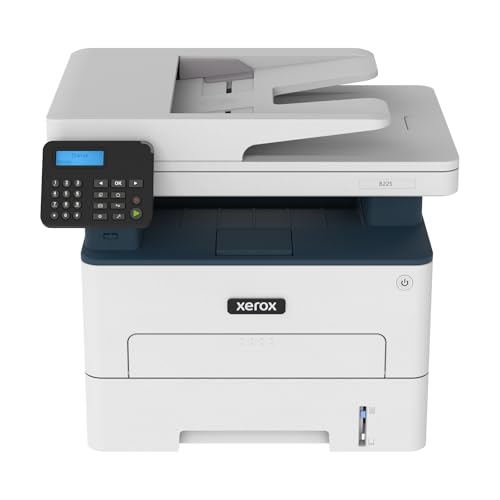
The Xerox B225DNI is positioned for home offices or small teams seeking wireless B&W printing with convenient mobile support and an automatic document feeder. It emphasizes easy setup, wireless connectivity, and energy-conscious operation. Best for: users who value simple, reliable printing and easy mobile access. Caution: while capable, it may have fewer advanced color handling features than dedicated color printers and is optimized for monochrome tasks.
Buying Guide
What matters most in an all-in-one toner printer?
- Print speed and duplex performance: Consider pages per minute (ppm) and whether the device supports automatic two-sided printing for lengthy documents.
- Paper handling: Look at paper tray capacity and the presence of an auto document feeder for scanning and copying multi-page jobs.
- Connectivity: Dual-band Wi-Fi, Ethernet, and USB options enable flexible placement and reliable access across devices.
- Security and management: Features like secure print, user access controls, and easy remote management help in office environments.
- Cost of ownership: Toner yield, page coverage, and replacement costs influence long-term expenses more than the upfront price.
- Color vs monochrome: If color output is necessary, choose a color-capable model; otherwise a monochrome device typically offers lower running costs.
How to choose by scenario?
- Small teams with heavy document output: Prioritize models with fast black-and-white speeds, large document feeders, and reliable wireless connectivity (e.g., HP MFP 3101fdw, HP M235sdw).
- Space-conscious home offices: Look for compact footprints and simple setup (e.g., Brother MFC-L2820DW).
- Color requirements for reports or marketing materials: Consider color-capable all-in-one models like Brother MFC-L3780CDW, while weighing color toner costs.
- Frequent mobile printing: Favor printers with strong mobile printing support and easy cloud app integration (e.g., Xerox B225DNI).
Maintenance and support considerations
- Warranty and service options: Review the vendor’s service terms for business use.
- Toner availability and yield: Higher-yield toner cartridges reduce replacement frequency for busy offices.
- Software and drivers: Ensure compatibility with your operating systems and common work apps.
FAQ
- Q: Do all-in-one toner printers support fax, or is that feature dated?
- A: Some models include fax capabilities, but many modern devices focus on printing, scanning, and copying. Check the product features to confirm fax support.
- Q: Is duplex printing essential for a small office?
- A: Yes, automatic two-sided printing saves paper and cuts costs for long print runs.
- Q: What’s the difference between monochrome and color all-in-one printers?
- A: Monochrome printers print only black-and-white; color models add color toner for color documents, with higher running costs per page.
- Q: What connectivity should I prioritize?
- A: Dual-band Wi-Fi plus Ethernet provides flexible access across wired and wireless networks; USB is useful for direct printing from a PC.
- Q: Are these printers suitable for home offices or small teams?
- A: Yes, all five models are designed to balance compact form factors with office-grade performance suitable for small groups.