Looking for an all-in-one projector that handles streaming, apps, and big-screen viewing without extra gear? This guide highlights five ready-to-use, feature-packed projectors ideal for different buyers. From built-in apps and WiFi to auto focus and versatile placements, these models simplify setup and deliver cinema-like visuals. Perfect for a compact home theater, dorm room, or outdoor movie night. Below, find a quick summary table to compare each pick at a glance.
| Product | Best For | |
|---|---|---|
| Aepuosem 4K Support Native 1080P Touch Screen Projector | Tech enthusiasts who want a smart touchscreen and built-in apps | Smart touchscreen with dual-screen sync |
| XuanPad White Smart Mini Projector | Compact, portable home theater on the go | Officially licensed apps and 4K support |
| XGIMI MoGo 4 | Premium outdoor/indoor versatility with long battery life | PowerBase Stand for extended playtime |
| TOPTRO Smart Projector Bundled with Google TV Stick | Living rooms seeking built-in Google TV and 4K-capable streaming | Google TV with 10,000+ apps |
| WiMiUS P62 Pro | All-in-one connectivity and OTA app updates | Wi‑Fi 6, dual HDMI/USB, built-in apps |
4K Support Native 1080P Touch Screen Projector

The Aepuosem all-in-one projector centers on a built-in touchscreen that enhances everyday use. It supports HDR and a broad color gamut to deliver richer dark scenes and vibrant highlights. The device operates via a 7-inch touch display with dual-screen sync to the main screen, allowing direct control for selecting content, adjusting settings, and navigating menus without constantly reaching for a remote. This model is best for tech lovers who want a self-contained experience with minimal extra devices. A caveat: some apps may disable swipe gestures, so using the bottom navigation bar is recommended for content selection.
Who this is best for: home theater setups where quick content selection without remotes improves convenience, families who value touch controls, and users who want a standalone multimedia hub in a single box.
Why selected: It combines streaming app access with a touch-first interface and a cinema-grade LCD engine, aiming to deliver an all-in-one solution for both casual viewing and more interactive usage.
Caution: Depending on app performance, you may need to rely on bottom navigation over gestures for certain content.
Officially-Licensed App & Auto Focus White Smart Mini Projector

The XuanPad mini projector emphasizes a licensed app approach with Netflix and other streaming services, plus 4K support and 1080P native resolution. Its auto-focus and a 180-degree stand offer flexible placement for different rooms and outdoor setups. The device targets users who want a compact, travel-friendly unit that still delivers strong color and clarity for home theater use. It’s well suited for dorm rooms, small apartments, and camping trips where portability matters.
Who this is best for: viewers prioritizing licensed streaming apps and an easy setup with flexible mounting options in smaller spaces.
Why selected: It combines licensing for popular apps with high-resolution output and a practical stand design, enabling quick deployment in various environments.
Caution: The native resolution and brightness are suitable for medium-light rooms; very bright environments may reduce perceived contrast.
Mini Projector With WiFi 6 And Bluetooth 5.4

The Wowlink W210 brings 4K compatibility with a native 720P resolution and a 4K HDR playback option, powered by WiFi 6 and Bluetooth 5.4. It includes an air remote function for wrist gestures and built-in apps for Prime Video and YouTube. This model is best for travelers or apartment dwellers who want a portable device capable of streaming with minimal external gear. One limitation is its native resolution; while it handles 4K content, the native display remains 720P for some content, which affects sharpness at larger screen sizes.
Who this is best for: users who value portability, built-in streaming apps, and modern wireless connectivity for casual viewing on the go.
Why selected: It offers a strong balance of wireless versatility, application support, and handheld convenience, making it easy to share content anywhere.
Caution: The device’s native resolution is 720P, so very large, highly detailed displays may not appear as crisp as higher-native models when projecting large images.
CiBest Mini Projector With WiFi And Bluetooth
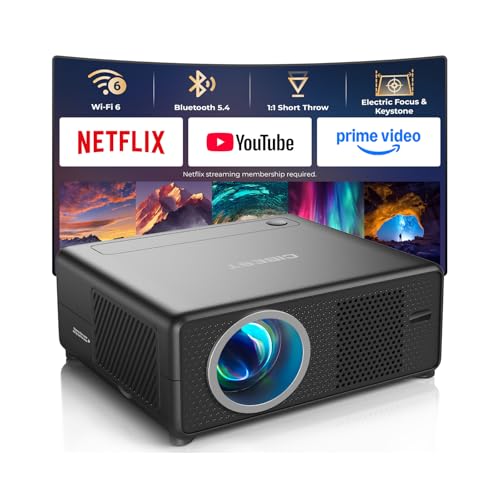
CiBest emphasizes broad streaming compatibility with Netflix, YouTube, Prime Video, and access to an app store for thousands of additional apps. It features WiFi 6 and Bluetooth 5.4 for smooth streaming and flexible audio setups. One-click focus and keystone correction simplify quick placements for outdoor movies or bedroom use. This projector targets users who want a straightforward setup with a rich app ecosystem and easy screen alignment.
Who this is best for: viewers who want ready-to-go streaming without extra streaming sticks and quick setup for both indoor and outdoor use.
Why selected: Its built-in app ecosystem and modern wireless standards provide a convenient, plug-and-play experience in versatile environments.
Caution: Budget-conscious buyers should note that brightness levels may limit performance in high ambient light settings; consider darker rooms for best results.
XGIMI MoGo 4 Portable Projector

The XGIMI MoGo 4 offers an extended battery life with the PowerBase Stand, enabling up to 5 hours of playback for extended outdoor movie nights or camping. Its 360-degree adjustable stand and ISA technology help align images across different viewing angles. The projector delivers strong audio with built-in Harman Kardon speakers, and the 450 ISO lumens provide clear visuals for dimmer rooms. This choice is best for users who value portability, long playtime, and premium audio in both indoor and outdoor settings.
Who this is best for: outdoor enthusiasts and apartment dwellers who need a flexible, high-quality, portable projector with robust audio.
Why selected: It combines long runtime, adaptable mounting, and premium sound in a compact package, reducing the need for extra accessories.
Caution: In very bright rooms, luminance may be limited; consider dimming room lighting for optimal contrast.
Smart Projector Bundled With Google TV Stick

This TOPTRO bundle integrates a Google TV experience directly into the projector, featuring access to 10,000+ apps and voice control with Google Assistant. It supports native 1080P and 4K decoding, with ultra-short throw capability that projects a 120-inch image from a compact distance. AI auto-setup handles focus, keystone, obstacle avoidance, and screen fit for quick, clean pictures. This model suits buyers who want a room-ready smart projector with a simple setup and broad streaming options.
Who this is best for: families and entertainment spaces seeking a seamless, all-in-one smart projector with broad app availability and easy setup.
Why selected: The Google TV integration and short-throw design simplify setup in smaller rooms while offering a large viewing experience.
Caution: Auto-setup features are helpful, but manual tweaks may still help in challenging placement scenarios; keep a short throw distance in mind for optimal image size.
Buying Guide: How To Choose The Right All-In-One Projector
- Smart features and apps: If you want built-in streaming without extra devices, prioritize models with robust app ecosystems and licensing (Netflix, Prime Video, YouTube, etc.).
- Resolution and brightness: Look for native 1080P or 4K capability and ensure brightness suits your room’s lighting. HDR support improves color and contrast.
- Throw distance and placement: Ultra-short-throw designs maximize wall space in small rooms; long-throw units can project larger images in bigger spaces.
- Audio quality: Integrated speakers are convenient, but for enhanced sound, consider models with high-quality built-in speakers or easy Bluetooth pairing for external audio.
- Connectivity: Prioritize WiFi 6 or newer for stable streaming, multiple HDMI/USB ports for gaming consoles or media sticks, and features like AirPlay or Miracast for screen mirroring.
- Portability vs. stability: Battery-powered models enable outdoor use, but plugged-in units may offer brighter pictures and longer run times. Consider where you’ll use the projector most.
- Auto-setup vs. manual calibration: Auto focus, keystone correction, and obstacle avoidance simplify setup, but manual fine-tuning often yields the sharpest image.
FAQ
- What is the benefit of an all-in-one projector with built-in apps?
Answer: It eliminates the need for external streaming devices and simplifies setup by providing direct access to streaming services and content. - Do these projectors support 4K content?
Answer: Many models support 4K decoding or native 1080P with 4K compatibility, enabling high-quality playback on supported sources. - Is auto-focus important for setup?
Answer: Yes. Auto-focus and auto-keystone help achieve a clear, rectangular image quickly, especially in rooms with imperfect walls or ceilings. - Can I use these projectors outdoors?
Answer: Several models offer portable design and lightweight stands, making outdoor movie nights feasible, though outdoor brightness and weather considerations apply. - Will built-in speakers be sufficient for a movie night?
Answer: Built-in speakers are adequate for casual viewing, but for a larger audience or richer sound, pairing external speakers via Bluetooth or HDMI audio is common. - Do I need a streaming stick with these projectors?
Answer: Not necessarily. Many come with built-in apps and Google TV or Roku-like interfaces, reducing the need for external devices.