Looking for an all-in-one (AIO) printer that excels at photo printing? This guide highlights five top options that balance photo quality, ease of use, and multi-function capabilities. The best picks cater to different buyers: families needing versatile home printers, hobbyists focusing on vibrant photo output, and portable users prioritizing compact design. The table below compares core strengths to help you decide quickly.
| Product | Best For | Why It Stands Out |
|---|---|---|
| HP Envy Photo 7975 | Families & small homes | AI-enabled printing with high-quality photos and broad functionality |
| Liene M100 | Mobile photo printing on the go | Thermal dye sublimation for durable 4×6 photos and compact design |
| HP Smart Tank 5103 | Ink-saver & high-volume users | Cartridge-free, long-lasting ink with AI-enabled features |
| KODAK Dock Plus 4×6 | Direct smartphone printing | Docking stand and quick dye-sub prints |
| Canon PIXMA PRO-200S | Professional-looking photo projects | 8-color dye-based inks with wide media support |
HP Envy Photo 7975 Wireless Color Inkjet Photo Printer

The HP Envy Photo 7975 is a premium all-in-one designed for home use. It prints high-quality photos, documents, and creative projects with wireless setup and mobile printing support. It is AI-enabled to adapt to your workflow, helping optimize layouts and reduce wasted pages. Best for families and students who want a versatile home printer that can handle photos and school/work tasks in one device. A potential limitation is the need for compatible cartridges or ink planning for higher photo workloads.
Liene M100 4×6” Photo Printer

The Liene M100 is a compact, portable 4×6 photo printer designed for quick, on-the-go prints from iPhone, Android, and PC. It includes enough cartridges and paper for substantial use out of the box, plus a battery-friendly design and built-in Wi-Fi hotspot. It’s best for mobile users who want fast, durable 4×6 prints without a bulky setup. A limitation is the need to manage consumables (cartridges and paper) for continued operation.
HP Smart Tank 5103 Wireless All-in-One
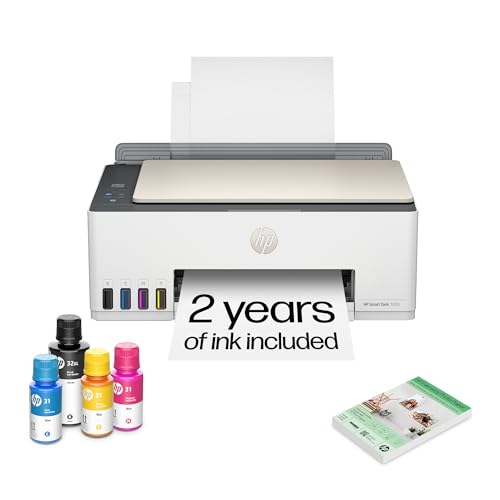
The HP Smart Tank 5103 is a cartridge-free, AI-enabled all-in-one with long-lasting ink. It’s ideal for households that print frequently and want lower ongoing costs, plus easy maintenance. Best for high-volume color printing with simple refills. A potential drawback is that the initial ink fill is substantial, which may be more than casual users need.
KODAK Dock Plus 4×6” Photo Printer

The KODAK Dock Plus provides direct 4×6 printing from smartphones with an integrated docking station for easy connection and charging. It uses 4PASS dye-sub printing to deliver durable, water- and fade-resistant photos in about a minute. Best for those who want fast, stand-alone photo prints with minimal computer interaction. Limitation: corded docking requires proximity to a device during printing.
Canon PIXMA PRO-200S Professional 13″ Wireless Inkjet Photo Printer

The Canon PIXMA PRO-200S uses an 8-color dye-based ink system to deliver vibrant, high-quality photos with borderless printing up to 13″ x 19″. It’s suited for serious photo projects and creators who need professional-looking prints and wide media support. Best for hobbyists and semi-professionals; choose this if you require deep color accuracy and larger print formats. Limitation: higher learning curve for achieving consistent color results.
Epson Expression Photo XP-980 Wireless Wide-Format Printer

The Epson Expression Photo XP-980 offers 6-color Claria Photo HD inks for high-quality borderless prints up to 11″ x 17″. It’s designed for users who want versatile wide-format printing and built-in scanning, with a 4.3″ color touchscreen for easier operation. Best for budding photographers who need poster-sized photo options and easy-to-use software. Limitation: larger footprint than compact photo printers can be a consideration for small desks.
Buying Guide
What to consider when choosing an AIO printer for photos:
- Photo quality vs. document printing: If your priority is vivid photos, look for printers with dedicated photo ink sets or dye-sub technology and borderless print capability.
- Ink system and running costs: Cartridge-free or high-yield ink options save money over time. Consider total cost of ownership beyond initial price.
- Media compatibility: Check supported photo paper sizes (4×6, 5×7, 8×10, 11×17) and types (glossy, matte, luster). Larger formats are important for portfolios or home galleries.
- Connectivity and ease of use: Wireless printing, mobile apps, and direct printing from smartphones speed up workflows. A simple user interface helps less tech-savvy users.
- Maintenance and reliability: Printers with built-in maintenance features, clear cartridge status, and predictable performance reduce downtime.
Frequently Asked Questions
- What is an AIO printer best for photo printing?
Printers with strong photo capabilities, borderless printing, and dedicated photo inks provide better color accuracy and durability for photos.
- Should I prioritize an ink-tank system or cartridge-based ink?
Ink-tank systems offer lower running costs for high-volume printing, while cartridge-based models can be cheaper upfront for light use.
- Do wireless features affect photo quality?
No, wireless features primarily affect convenience. Photo quality is determined by the ink system and print driver, not the connection type.
- Is a 4×6 printer enough for photos?
For casual prints and albums, 4×6 is sufficient. For professional-looking prints, consider printers that support larger formats up to 11″ x 17″ or 13″ x 19″.
- What maintenance is required for AIO photo printers?
Regular cleaning of printheads, using recommended paper, and timely ink or cartridge replacements help maintain print quality.
- Are these printers suitable for kids’ schoolwork?
Yes, most listed models balance photo printing with document tasks, making them suitable for homework and creative projects.