When shopping for an ADSL modem or modem router, you want a device that delivers stable connections, simple setup, and solid security. This guide highlights five practical ADSL-enabled options that cater to different needs—from pure modem utilities to combined router functionality. Ideal buyers include budget-conscious apartment dwellers seeking straightforward connectivity, small households needing reliable Wi‑Fi alongside ADSL, and users who require simple bridge or standalone modem capabilities. The table below compares the chosen models and helps you pick the right fit at a glance.
| Product | Best For | Key Benefit |
|---|---|---|
| Actiontec 300 Mbps Wireless-N ADSL Modem Router GT784WN | Budget-friendly households needing wireless and ADSL | Preconfigured, simple setup with solid firewall and parental controls |
| TP-Link Archer VR300 AC1200 Wireless VDSL/ADSL Modem Router | Small homes wanting reliable Wi‑Fi and ADSL/VDSL support | Dual-band AC1200 with integrated modem router |
| NETGEAR AC1600 WiFi VDSL/ADSL Modem Router (D6400) | Mixed-provider environments needing robust Wi‑Fi | Two-in-one VDSL/ADSL modem with AC1600 Wi-Fi |
| TP-LINK TD-8817 ADSL2+ Modem | Purist modem for bridge-mode or wired setups | Bridge mode option and firewall features |
| D-Link ADSL2+ Ethernet Modem (DSL-520B) | Simple, no-frills ADSL connection | High-speed ADSL with firewall and QoS |
Actiontec 300 Mbps Wireless-N ADSL Modem Router GT784WN
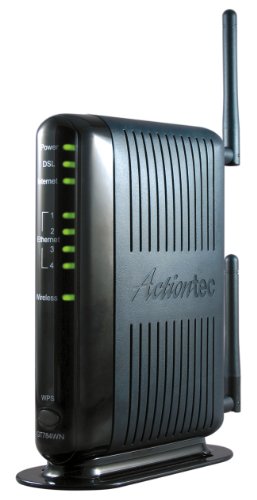
Best for budget-conscious buyers needing an all-in-one ADSL solution with built-in wireless. This model supports CenturyLink ADSL (not VDSL) and major DSL providers, but is not compatible with Verizon FIOS, AT&T U-verse, or typical cable ISPs. It includes TKIP/AES encryption, 802.1x authentication, pre-shared keys, MAC filtering, and easy auto-detection of service settings. A high-grade firewall and parental controls offer basic protection for home networks.
Who it’s best for: small households or renters who want a simple, single-device setup without extra accessories. Why selected: strong compatibility with common ADSL providers and straightforward security features help avoid setup confusion. Caution: not compatible with fiber or most cable ISPs, and some modern Wi‑Fi devices may perform better with newer standards.
TP-Link TD-W9950 300Mbps Wireless N VDSL/ADSL Modem Router

Best for users who want a compact device that handles both VDSL and ADSL with wireless capability. This model provides modest throughput suitable for typical streaming and browsing in small homes. It’s a simple all-in-one solution, making setup straightforward for standard DSL connections.
Who it’s best for: households needing basic Wi‑Fi plus DSL modem functionality in a single unit. Why selected: versatility with both VDSL and ADSL support in one device. Caution: performance may be limited for heavy multi-device use or high-bandwidth tasks.
TP-Link Archer VR300 AC1200 Wireless VDSL/ADSL Modem Router

Best for small households seeking better Wi‑Fi coverage with a combined modem router. The Archer VR300 supports AC1200 speeds, providing reliable wireless performance alongside ADSL/VDSL compatibility. It is suitable for households with multiple devices streaming HD video or video conferencing.
Who it’s best for: users prioritizing stable wireless performance in a compact home. Why selected: dual-band Wi‑Fi with integrated DSL modem enables seamless connectivity. Caution: actual speeds depend on ISP service and line quality; VDSL is supported, but not all fiber services will benefit.
NETGEAR AC1600 WiFi VDSL/ADSL Modem Router D6400
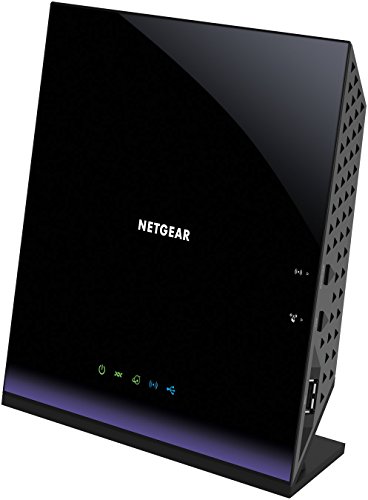
Best for mixed-provider environments requiring stronger Wi‑Fi alongside a DSL modem. The D6400 supports AC1600 Wi‑Fi across both bands and serves as a two-in-one device for VDSL/ADSL connections. It’s a solid option for households with multiple active devices and streaming needs.
Who it’s best for: homes with several wireless devices and a need for reliable DSL connectivity. Why selected: higher Wi‑Fi throughput and convenient all-in-one design. Caution: larger footprint may be less suitable for compact spaces; ensure adequate ventilation.
D-Link ADSL2+ Ethernet Modem (DSL-520B)

Best for users who want a dedicated ADSL2+ modem with firewall protections and QoS. This model emphasizes straightforward Ethernet connectivity without integrated wireless. It’s suitable for wired setups or as a bridge device in a larger network.
Who it’s best for: users who prefer a dedicated modem and wired network, or want to bridge to a separate router. Why selected: reliable ADSL2+ performance with essential firewall features. Caution: no built-in wireless; you’ll need a separate router for Wi‑Fi.
Buying Guide: Choose the Right ADSL Modem or Modem Router
What kind of device do you need?
Decide between a dedicated modem, a modem router, or a pure bridge device. If you want Wi‑Fi built in, a modem router like the Actiontec GT784WN or TP-Link Archer VR300 can simplify setup. For a wired-only network or a bridge scenario, a pure modem like the D-Link DSL-520B is a solid choice.
Compatibility and line type
Confirm compatibility with your ISP and line type (ADSL, ADSL2+, or VDSL). Some devices support both ADSL and VDSL, while others are limited to ADSL or VDSL. If you’re moving from one technology to another in the future, choose a device with broader compatibility, such as VDSL/ADSL support.
Performance and coverage
Consider required Wi‑Fi speed and room layout. Household streaming, gaming, or multiple devices benefit from dual-band or better Wi‑Fi standards. If you need only a modem, prioritize stability and security features over wireless capabilities.
Security and management features
Look for built-in firewall, encryption (WPA2/WPA3 when available), parental controls, and easy setup. A device with MAC filtering and PSK is useful for controlling network access.
Ease of setup and ongoing maintenance
Devices with auto-detect service settings or clear installation guides reduce setup time. Consider products with straightforward firmware updates and a simple web interface for ongoing changes.
Future-proofing and support
If you anticipate future DSL upgrades or more connected devices, choose a device with robust firmware support and a broad feature set. Check whether the manufacturer offers regular updates and security patches.
Quick comparison by use case
- Best all-in-one for small spaces: Actiontec GT784WN or TP-Link VR300
- Better for multi-device homes with strong Wi‑Fi: NETGEAR D6400
- Choose this if you want a dedicated modem: D-Link DSL-520B
FAQ
- What is the difference between ADSL and VDSL devices?
Some devices support only ADSL, some support both ADSL and VDSL; choose based on your line type. - Is a modem router better than a standalone modem?
If you want wireless internet in one device, a modem router is convenient; for wired networks, a standalone modem plus separate router can be more flexible. - Do I need encryption on my DSL modem?
Yes. Use at least WPA2 security and enable the built-in firewall for protection against online threats. - Can I use these devices with any ISP?
Compatibility varies by provider and service type; verify DSL standards and any provider restrictions before purchase. - What is bridge mode and when should I use it?
Bridge mode disables the router features, turning the device into a pure modem. Use it if you already have a dedicated router you want to keep. - Will a higher Wi‑Fi standard improve my streaming?
Yes, devices with AC or AX (Wi‑Fi 5/6) generally offer better throughput for multiple devices and high-definition streaming.