Discover top A3 multi-function printers (MFPs) that handle printing, scanning, copying, and sometimes fax. This guide highlights five models suited to small offices or teams that need larger-format output, fast workflows, and reliable connectivity. Each pick includes who it’s best for, why it stands out, and practical trade-offs. Use the buying guide and FAQ to compare formats, speeds, and capabilities before you buy.
Overview Of Selected Models
| Product | Best For | Format | Highlights |
|---|---|---|---|
| Kyocera ECOSYS M8124cidn | Color printing for teams needing up to A3 | A3 | Fast color output, HyPAS apps, robust paper handling |
| HP CC524A LaserJet Enterprise 700 MFP M775z (Renewed) | Enterprise-level features on a budget (renewed) | Ledger/A3 | Certified refurbished, strong security features |
| HP Color LaserJet Pro MFP 3301sdw | Color MFP for small teams at moderate volume | A4 | Color performance, duplex scanning, wireless |
| HP Color LaserJet Pro MFP 4301fdw | Color MFP with fast color speed for small teams | A4 | Duplex, fast color pages, reliable Wi‑Fi |
| HP Color LaserJet Pro MFP 3301fdw | Balanced color MFP with versatile features | A4 | ADF, duplex, strong color output |
Notes: The A3 requirement is most directly met by the Kyocera M8124cidn and the refurbished HP CC524A model. The remaining HP models are excellent for color MFP needs in small offices where A4 is sufficient, but they provide robust features that complement A3-capable devices when needed.
Kyocera ECOSYS M8124cidn: A3 MFP Powerhouse

The Kyocera ECOSYS M8124cidn is designed for color A3 output with multi-function capability. It offers up to 24 color pages per minute and a 4.3-inch color touch screen for straightforward operation. HyPAS compatibility enables Kyocera apps to streamline workflows, while scalable paper capacity supports larger print jobs. Best for mid-size teams that require occasional large-format prints (A3) and reliable scanning. Limitations include a more complex setup for beginners and larger footprint compared to compact A4 models.
HP CC524A LaserJet Enterprise 700 MFP M775z (Renewed)
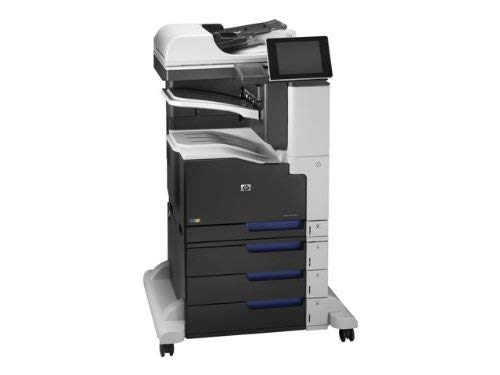
This renewed model targets small business environments that need durable, enterprise-level MFP capabilities with color output and A3/Ledger compatibility. It comes with the necessary functionality for large documents, scanning, and copy tasks, accompanied by a minimum warranty from the seller. Best for buyers who want a lower initial cost and are comfortable with refurbished units. Caution: refurbished devices may have variable availability and require checking the current warranty and return policy.
HP Color LaserJet Pro MFP 3301fdw: Balanced Color MFP

Designed for small teams needing reliable color output with robust scanning and copy capabilities. This model supports duplex printing, auto document feeder, and wireless connectivity for flexible office layouts. Best for color-focused workgroups that do not require true A3 printing on a regular basis. Limitation: not an A3 printer, so for frequent large-format jobs you’ll need a dedicated A3 device.
HP Color LaserJet Pro MFP 4301fdw: Fast Color MFP
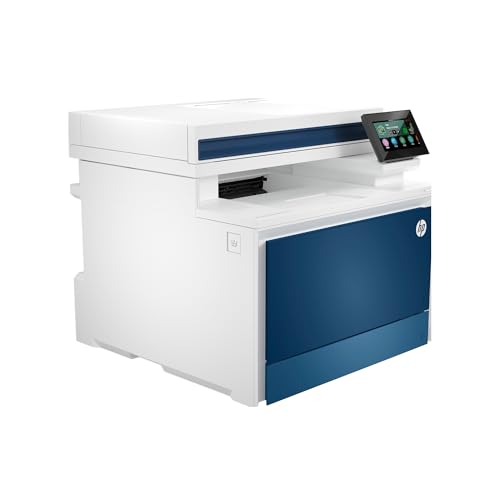
Ideal for small teams that require rapid color output and efficient document handling. It offers auto 2-sided printing, duplex scanning, and an auto document feeder to keep workflow moving. Best for offices needing strong color speed and reliable network connectivity. Caution: the device is designed primarily for A4 media; regular A3 work should be planned on a capable A3 unit when needed.
HP Color LaserJet Pro MFP 3301sdw: Solid Color A4 MFP

This model provides dependable color MFP performance for small teams needing scanning, copying, and fax capabilities in an A4 footprint. It supports auto duplex scanning and wireless printing, making it a practical all-rounder for compact office spaces. Choose this if you primarily operate with A4 media and want a reliable, easy-to-manage device with strong software features.
Buying Guide: Key Considerations For Choosing An A3 MFP Printer
Format needs: Do you regularly print in A3, or is A4 sufficient most of the time? If frequent A3 work is required, prioritize models with true A3 printing, larger paper trays, and robust media handling.
Color vs. black-and-white: For marketing materials, reports, and color invoices, color MFPs are advantageous. If black-and-white suffices for most documents, a monochrome A3 MFP can be more cost-effective.
Print speed and duty cycle: Consider pages per minute (ppm) for your typical daily volume. A higher duty cycle helps ensure reliability during busy periods.
Connectivity: Look for Wi‑Fi, Ethernet, Apple AirPrint, Google Cloud Print compatibility, and mobile printing options. Strong network stability reduces interruptions in small offices.
Paper handling: Examine input trays, output tray capacity, and the ability to handle heavier media. A3 devices should support larger paper formats and multipurpose trays for specialty media.
Security and manageability: For office environments with sensitive data, seek devices with secure print, user authentication, and centralized administration features.
Cost of ownership: Consider consumables like toner/ink yield, the cost of replacement parts, and potential maintenance plans. Refurbished options may lower upfront cost but require careful warranty review.
FAQ: Quick Answers To Common Questions
- What does A3 printing mean on a printer? A3 printing uses a larger paper size (11.7 x 16.5 inches) than the standard A4, enabling bigger layouts and charts. Not all MFPs support A3; confirm paper size support in the product specs.
- Are refurbished or renewed models reliable for business use? Refurbished units can offer strong value if they include a warranty, return policy, and verified functionality. Check seller details and ensure required support is available.
- Is color essential for an MFP in a small office? If your business communicates with customers through colored reports, marketing materials, or color invoices, color printing adds value. If most work is internal, monochrome may suffice.
- How important is speed for a small office MFP? Speed reduces wait times for large print runs. Choose a model with dual-sided printing and a comfortable ppm rate for your daily volume.
- What features should I prioritize for office efficiency? Auto duplex printing, an automatic document feeder, strong wireless/network connectivity, and a user-friendly interface typically boost daily productivity.
- Do I need fax capability? Fax remains useful in some industries, but many offices rely on digital document delivery. If you don’t need fax, you can select a model without it to save costs.
All recommended models provide robust MFP capabilities with various strengths. For frequent large-format needs, prioritize A3-capable devices like Kyocera or the HP option explicitly listed for Ledger/A3 formats. For color printing and general office use, the HP color MFPs offer strong performance with flexible connectivity and document handling.