Find the right 8-port PoE switch for reliable power and data delivery in small offices or home networks. This guide highlights top options, clarifies who each model suits best, and explains why these picks stand out for surveillance, IP cameras, and smart devices. The listed products are organized to help you compare power budgets, management features, and mounting options at a glance.
Summary table of selected products:
- TP-Link LS108GP — 8 PoE+ ports, 65W total budget, Extend Mode, silent desktop or wall-mount
- NETGEAR GS308EP — 8 PoE+ ports, 62W budget, Easy Smart Managed Essentials
- STEAMEMO 8-Port PoE+ — 120W budget, smart management, VLAN/QoS support
- TP-Link TL-SG1008MP — 153W budget, Plug & Play, port priority
- NETGEAR GS308PP — 83W budget, unmanaged (simplified setup)
TP-Link LS108GP: 8-Port PoE Gigabit Switch

Best for surveillance-ready deployments and small office setups that need reliable PoE power with quiet operation. The LS108GP provides eight PoE+ ports with a total budget of 65W, and it supports up to 30W per port. It also includes Extend Mode for longer PoE transmission distances and PoE Auto Recovery to reboot dropped devices automatically. This makes it ideal for camera networks in larger offices or campuses where distance matters.
Key suitability:
- Surveillance and IP cameras in medium areas benefit from Extend Mode.
- Small offices seeking plug-and-play PoE with minimal maintenance.
Why chosen: The eight PoE+ ports and Extend Mode make it a practical pick for users prioritizing simple setup and extended reach without extra management software. The silent operation is a plus for quiet workspaces. A potential limitation is that the total PoE budget (65W) is lower than some larger budget models, which could restrict multiple high-power devices simultaneously.
NETGEAR GS308EP: 8-Port PoE Gigabit Unmanaged Switch

Best for users who want an uncomplicated, feature-light PoE switch with basic management essentials. The GS308EP offers 8 PoE+ ports with a total budget of 62W and includes Easy Smart Managed Essentials software. This makes it suitable for small offices that desire straightforward monitoring, security, and device prioritization without a heavy IT setup.
Why chosen: Its unmanaged-to-lightly-managed approach helps keep costs and complexity low while still enabling basic control. It is less suited for networks needing advanced VLAN configurations or extensive QoS beyond the Essentials suite. For high-power devices or camera clusters, the budget may be a constraint compared to larger switches.
STEAMEMO 8-Port Managed PoE+ Switch

Best for small businesses or home offices needing smart management features. This switch provides eight PoE+ ports with up to 30W per port and a 120W total budget. It supports QoS, VLANs (802.1Q), DHCP Snooping, port mirroring, and other enterprise-like controls. It also offers management via a web interface, desktop software, or mobile app for centralized control.
Why chosen: The combination of PoE+, high total budget, and enterprise-like features makes it a strong all-around option for networks that require traffic prioritization, security controls, and remote management. Limitations include potential complexity for users who prefer plug-and-play simplicity and the need for adequate power planning to maximize the 120W budget.
TP-Link TL-SG1008MP: 8-Port PoE Gigabit Switch

Best for users who want a budget-friendly, plug-and-play PoE switch with strong power capacity. It delivers 8 PoE+ ports with a total budget of 153W and a flexible configuration. The device is designed to be simple to deploy, with auto power management that can disable lower-priority ports if power exceeds the budget.
Why chosen: The high total budget makes it better for multiple PoE devices, including cameras and access points, compared with some compact models. It is not ideal if you need advanced management features beyond basic port priority and auto-recovery. The priority-based power control helps prevent overloads but may disable ports unexpectedly if you push the budget limits.
NETGEAR GS308PP: 8-Port PoE+ Gigabit Unmanaged Switch
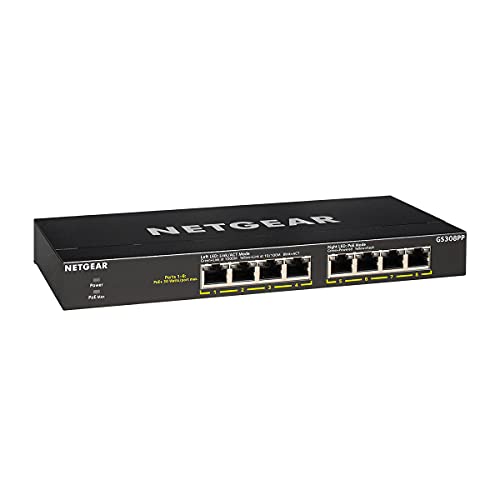
Best for straightforward deployments where no software setup is desired. The GS308PP offers 8 PoE+ ports with a 83W total budget and a simple plug-and-play design. This makes it ideal for small offices or home environments that need reliable power delivery without configuration overhead.
Why chosen: Its unmanaged nature minimizes setup time and IT overhead. If your network needs more granular control, consider a managed or smart switch instead. The 83W budget is adequate for several cameras or APs but may be limiting with many high-power devices running concurrently.
REOLINK RLA-PS1: 8 PoE Ports with 2 Gigabit Uplinks

Best for REOLINK camera ecosystems and installations requiring PoE with flexible uplinks. The RLA-PS1 includes 8 PoE ports (IEEE 802.3af/at) and 2 Gigabit uplinks, with a 120W total budget. It’s designed to support IP cameras and smart devices while enabling easy integration with REOLINK systems.
Why chosen: The dual uplink ports provide added routing flexibility, which is useful for expanding camera networks. A limitation is that some users may require more advanced management features not included in this model. Power budgeting should be planned for larger camera deployments.
Buying Guide
- Power budget and port count: Compare total PoE budget (W) and per-port maximum. Higher budgets are better for multiple high-power devices like PoE cameras or access points.
- Managed vs. unmanaged: Managed or smart switches offer QoS, VLANs, and security features. Unmanaged options are simplest and fastest to deploy but lack advanced controls.
- Distance and Extend Mode: If you need longer PoE distances, look for Extend Mode or similar features to support cameras or devices far from the switch.
- Mounting options and noise: Desktop, wall-mount, or rackmount compatibility affects placement. Silent operation is beneficial in quiet offices.
- Future expansion: Consider switches with additional uplinks or higher budget if you expect expanding IP devices in the near term.
- Security and management: For small businesses, opt for switches with basic security features (DHCP Snooping, VLANs) if you plan to segment networks.
FAQs
- What is PoE? PoE powers devices through Ethernet cables, combining data and electricity over a single line.
- Do I need a managed switch for IP cameras? Not always, but managed switches offer better traffic control, QoS, and VLAN options for camera networks.
- How many devices can a PoE switch power? It depends on the total budget and per-port power; high-budget switches can power multiple cameras or APs simultaneously.
- Is 8-port PoE enough for a small office? For many small offices, yes, especially with a mix of cameras, phones, and access points. Assess device power needs first.
- Can I expand later? Yes, most switches stack or connect to additional devices, but check compatibility and power planning.
- What is Extend Mode? Extend Mode increases PoE reach by reducing the data rate, enabling longer cable runs for cameras or devices farther away.