Answering the search for a reliable 65 inch TV corner mount, these options cover wide compatibility, solid weight ratings, and flexible articulation. They’re best for corner setups where space savings and precise viewing angles matter, including large 65″ to 84″ TVs. The top picks below are suitable for concrete, brick, or wood stud walls (not drywall alone) and offer extendable arms, swivels, and tilt adjustments to minimize glare and find ideal viewing angles. This guide highlights five strong choices and clarifies who each is ideal for.
| Product | TV Size Range | Mount Type | Best For |
|---|---|---|---|
| Perlegear Corner TV Wall Mount Long Arm | 37–75 inches | Full motion, long arm | Large living rooms, wide viewing angles |
| USX MOUNT Corner TV Wall Mount | 26–65 inches | Full motion, corner design | Compact corners, multi-angle viewing |
| MOUNTUP 37.9″ Long Arm Wall Mount | 42–75 inches | Full motion, long arm | Room-to-room viewing and extended reach |
| Perlegear Corner TV Wall Mount 42–84 inches | 42–84 inches | Full motion, long arm | Ultra-large TVs, sturdy corner mounting |
| USX STAR Corner TV Wall Mount Long Arm | 37–84 inches | Full motion, long arm | Corner placement with long reach |
Perlegear Corner TV Wall Mount Long Arm for 37-75 Inch TVs

Best for: Larger living spaces needing a long reach and strong security. This UL-listed corner mount supports up to 100 lbs and extends about 32.37″ with a 90-degree swivel range. It fits 37″–75″ TVs with VESA patterns from 200x100mm to 600x400mm and is designed for concrete, brick, or wood studs.
Why chosen: It combines a long-arm design with a robust hinge and post-install leveling for precise alignment. The tilt is tool-free, and the mount retracts to save space when not in use.
Caution: Do not mount on drywall alone; ensure a proper wall structure and secure anchors for heavy TVs.
USX MOUNT Corner TV Wall Mount With 31.22″ Long Arm
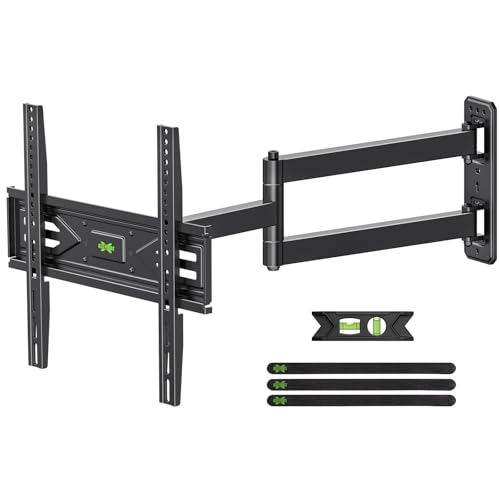
Best for: Tight corners where you still want extensive reach and flexible viewing. It supports 26″–65″ TVs up to 80 lbs and max VESA 400x400mm, with corner-specific design to unlock room space.
Why chosen: UL-listed safety and a solid hinge pin ensure stable, wobble-free motion even at full extension. The design makes corner placement straightforward while offering full motion adjustments.
Caution: Verify weight vs. TV spec to ensure compatibility, especially on larger screens near the upper weight limit.
MOUNTUP 37.9″ Long Arm TV Wall Mount

Best for: People who want a very long reach to cover multiple seating areas while saving wall space. Supports TVs 42″–75″ up to 99 lbs with VESA up to 600x400mm.
Why chosen: A 37.9″ extendable arm provides significant reach with a compact retraction to about 3″ from the wall. The full motion range (+/-90° swivel, +/-10° tilt) supports flexible viewing in large rooms.
Caution: Check TV size and weight, and ensure the installation surface can handle the extended load at maximum reach.
Perlegear Corner TV Wall Mount 42–84 Inches
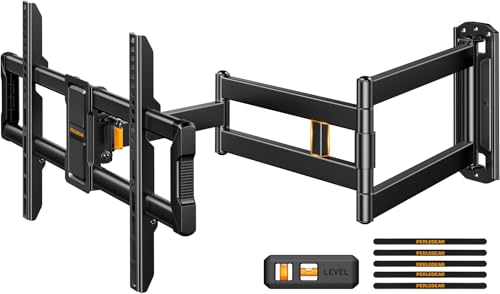
Best for: Ultra-large TVs in cornered rooms where space optimization is crucial. The mount supports up to 150 lbs with a long arm extending up to 37.2″ and retracting to 2.6″.
Why chosen: Enhanced strength and a wide VESA range (200x100mm to 600x400mm) make it suitable for bigger screens, while corner design saves room.
Caution: The heavy duty build may require two-person installation and proper wall anchors for heavier TVs.
USX STAR Corner TV Wall Mount Long Arm Full Motion
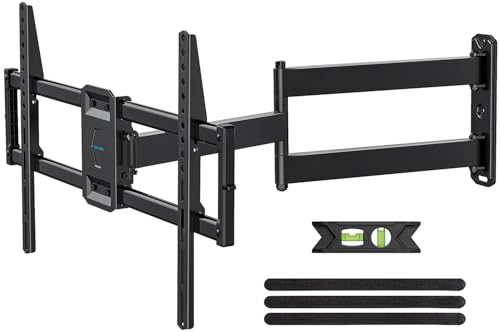
Best for: Large corner setups that require extensive reach and a high degree of flexibility. Fits TVs from 37″ to 84″ up to 100 lbs and supports multiple VESA patterns (including 600x400mm).
Why chosen: The 32″ extension arm enables viewing from varied room locations, and the retractable design preserves a clean look when not extended.
Caution: Ensure the wall structure can support the long arm at full extension and that the TV’s VESA pattern is compatible with the mount.
Buying Guide: Corner TV Mounts For 65 Inch And Larger Setups
- Weight and VESA compatibility: Check TV weight rating and VESA pattern. Choose a mount that supports your TV’s pattern (common ranges include 100x100mm to 600x400mm) and weight.
- Extension and space: Determine how far you need the arm to extend from the wall for your seating arrangement. Longer arms improve reach but may require more wall space clearance.
- Motion range: Look for full-motion options with swivels, tilts, and leveling. Tool-free tilts and easy leveling help align the TV after installation.
- Wall type and mounting: Most corner mounts require solid support such as wood studs, masonry, or concrete. Avoid drywall-only installations for heavier TVs.
- Installation considerations: Some mounts include long arms and heavy weight—plan for proper anchors, hardware, and potentially two installers for large TVs.
- Aesthetics and accessibility: If you prefer a clean look, prioritize mounts that retract close to the wall. For frequent angle changes, prioritize stronger hinges and smoother motion.
FAQ
- What size TVs are best with corner mounts?
– Corner mounts work well with TVs from mid-size to very large (26″–84″), but always verify weight and VESA compatibility. - Do I need to reinforce drywall when mounting a corner TV?
– Yes. Most corner mounts require studs or masonry anchors. Drywall alone is not sufficient for heavy TVs. - Can corner mounts be used in tight corners?
– Yes. Many models are designed to be mounted in corners and offer long arms to reach the screen from different seating areas. - Is a longer arm always better?
– Not always. A longer arm increases reach but requires more clearance. Choose based on room layout and viewing positions. - Do these mounts allow post-install leveling?
– Several models include post-install leveling features to fine-tune the TV after installation. - Are these mounts UL-listed or certified?
– Some models are UL-listed for safety. Always confirm product documentation for safety certifications.