The right 5K monitor can elevate a Mac workflow with razor-sharp details, wider color gamuts, and smoother visuals for creative work, gaming, and productivity. This guide highlights five prominent 5K-ready options and related high-resolution displays that pair well with Mac setups. Each choice offers a blend of resolution, color accuracy, and connectivity to help you decide which monitor best fits your needs.
Summary of Selected Products
| Product | Brand | Key Benefit |
|---|---|---|
| KTC 27 Inch 5K Monitor | KTC | 5120×2880 resolution with HDR 400 and flexible connections |
| ASUS ProArt Display 27” 5K HDR Monitor | ASUS | Wide color gamut, factory-calibrated for accuracy |
| BenQ PD2730S 27″ 5K Monitor | BenQ | Mac compatibility with Thunderbolt 4 and color accuracy |
| INNOCN 40 Inch 5K Ultrawide | INNOCN | Large ultrawide 5K with multiple connections |
| ARZOPA 16″ 2.5K Portable Monitor | ARZOPA | Compact, portable secondary display with high resolution |
KTC 27 Inch 5K Monitor Review
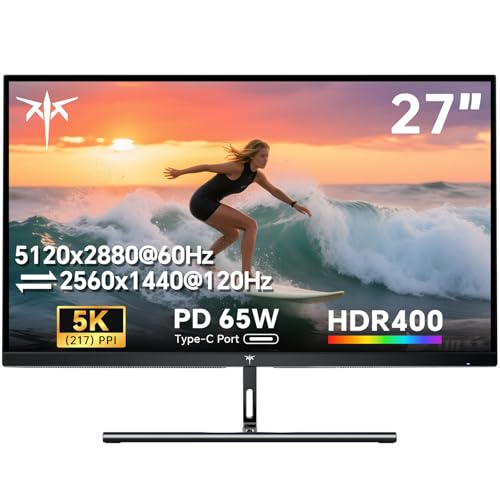
The KTC 27 inch 5K monitor delivers 5120×2880 resolution with 217 PPI, enabling ultra-sharp text and gradients ideal for Mac mini setups. HDR 400 enhances contrast for more vibrant images, while 5K modes support both 60Hz and 2K at 120Hz, tailoring visuals for tasks from photo editing to gaming. Connectivity includes a 65W USB-C port, DisplayPort 1.4, and HDMI 2.0, offering flexible integration with Macs, PCs, or consoles. The design emphasizes Tilt adjustment and a 75x75mm VESA pattern for versatile mounting. This model targets users seeking high pixel density and varied mode options on a single screen.
ASUS ProArt 27” 5K HDR Monitor (PA27JCV)

The ASUS ProArt 27” 5K HDR monitor provides a pristine color experience with a 27-inch 5K panel (5120×2880), IPS wide-angle viewing, and a 99% DCI-P3 plus 100% sRGB color gamut. It is Calman Verified and factory pre-calibrated to Delta E<2 for color accuracy, making it a strong choice for photographers, video editors, and design professionals working on a Mac. The monitor’s HDR capabilities and professional-grade color management aim to minimize post-production guesswork. An included Auto KVM and USB-C PD streamline Mac workflows where power delivery and peripheral switching are beneficial.
BenQ PD2730S 27″ 5K Mac Monitor

The BenQ PD2730S delivers 5120×2880 resolution with 218 PPI for a Retina-like display, aimed at Mac users needing precise color and professional-grade performance. It features 98% DCI-P3 and 2000:1 contrast, supporting accurate color reproduction across creative workflows. The Thunderbolt 4 compatibility enables up to 90W power delivery and high-speed data transfer, which can simplify Mac setups by reducing the number of required adapters. Additional features include KVM, Daisy Chain, and ergonomic height adjustment to support long work sessions with comfort and efficiency.
INNOCN 40 Inch 5K Ultrawide

The INNOCN 40 inch 5K ultrawide monitor combines 5120×2160 resolution with a broad 21:9 aspect ratio, delivering expansive workspace for multitasking and content creation. It uses an IPS panel with 135% sRGB and 106% DCI-P3 color coverage, HDR ready, and built-in speakers. Connectivity includes HDMI, DisplayPort, and a 65W USB-C power delivery port, enabling a single-cable setup for many Mac laptops. The large diagonal supports an immersive viewing experience for video editing, CAD work, and creative projects that benefit from extra horizontal screen real estate.
ARZOPA 16″ 2.5K Portable Monitor

While not a true 5K display, the ARZOPA 16″ 2.5K portable monitor offers a compact secondary screen option for Mac laptops, with a 2560×1600 resolution and a 16:10 aspect ratio. It features USB-C and HDMI connectivity, a built-in stand, and a slim profile suitable for mobile setups or on-the-go workflows. This option can complement a primary 5K display by extending screen real estate for reference materials, chat, or tool palettes when traveling or working remotely.
Buying Guide: Key Considerations For 5K Monitors On Mac
Resolution and pixel density matter, but color accuracy, connectivity, and ergonomics often determine long-term satisfaction. Consider these perspectives when choosing a 5K monitor for a Mac:
- Resolution and pixel density: For Mac users, 5K (5120×2880) delivers crisper text and detailed imagery. Ultrawide 5K options enhance multitasking but require ample desk space and potentially higher GPU power if used for gaming.
- Color accuracy: For photo and video work, a monitor with wide color gamut (DCI-P3, sRGB) and color calibration (Calman or factory calibration) ensures faithful production workflows. Check reports of ΔE<2 values.
- Connectivity: USB-C with power delivery simplifies MacBook and Mac mini setups. Ensure multiple input options (HDMI, DisplayPort) and daisy-chaining or KVM when needed.
- Ergonomics and mounting: Height adjust, tilt, swivel, and VESA compatibility reduce strain during long sessions. Consider wall mounting or adjustable arms if space is limited.
- Support and reliability: Look for manufacturers offering solid warranties, reliable service, and compatibility notes for macOS features such as color profiles or KVM support.
- Size and workspace: Large ultrawide displays can boost productivity for multi-document workflows, while 27-inch panels offer a balance between density and desk footprint.
- Price-to-performance balance: High-end 5K monitors command premium prices. Prioritize features that provide tangible benefits to your typical tasks, such as color accuracy, calibration options, and connectivity.
In summary, the best 5K monitor for Mac depends on your priorities—absolute pixel density, color-critical work, or expansive multitasking real estate. The options covered here balance these needs with robust connectivity and Mac-friendly features to support a wide range of professional and creative workflows.