Need a 4GB RAM stick to upgrade an older desktop or laptop? This guide highlights five solid 4GB modules, covering DDR3 desktops, DDR4 laptops, and DDR4 desktops. Each pick targets different user needs—from budget upgrades to higher compatibility—for a smoother, more responsive system. The top choices are best for entry-level multitasking, light gaming, or extending the life of aging machines. Below, compare who benefits most from each RAM stick and why they were included.
Buying Snapshot: Top 5 4GB RAM Sticks
| Product | Type | Speed | Form | Best For |
|---|---|---|---|---|
| 8GB Kit (2X4GB) DDR3 1600MHz PC3-12800U | Desktop DDR3 | 1600 MHz | DIMM | Older desktops needing DDR3 upgrade |
| PC3-10600U 8GB Kit (2X4GB) DDR3 1333MHz | Desktop DDR3 | 1333 MHz | DIMM | Budget upgrade for DDR3 desktops |
| Samsung 4GB DDR4 SODIMM 3200MHz | Laptop DDR4 | 3200 MHz | SO-DIMM | Ultrathin laptops and ultrabooks |
| Motoeagle 16GB Kit (4X4GB) DDR3 1333MHz | Desktop DDR3 | 1333 MHz | DIMM | Budget-heavy multitasking on older systems |
| Crucial 4GB DDR3 1600 MHz CL11 | Desktop DDR3 | 1600 MHz | DIMM | Simple, reliable upgrade |
8GB Kit (2X4GB) DDR3 1600MHz PC3-12800U

Type: Desktop DDR3, 2×4GB, 1600MHz, CL11, 1.5V. This kit is unbuffered, non-ECC, dual rank, and 240-pin DIMM. It’s best for older desktops requiring a straightforward memory bump without changing platform.
Best for: Budget-conscious users upgrading DDR3 desktops that still rely on 1600MHz memory. The two modules ensure dual-channel operation for improved throughput versus a single 4GB stick.
Why selected: Compatibility with typical DDR3 desktops makes this a reliable upgrade path for systems not supporting DDR4. It’s tested for stability across common AMD/Intel platforms.
Caution: Performance gains are limited to earlier architectures; newer systems with DDR4 won’t benefit from DDR3 memory.
PC3-10600U 8GB Kit (2X4GB) DDR3 1333MHz
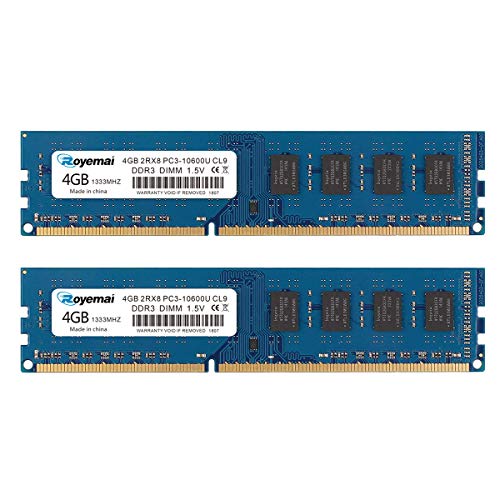
Type: Desktop DDR3, 2×4GB, 1333MHz, CL9, 1.5V. This kit is compatible with both AMD and Intel desktop systems that still rely on DDR3 memory and 240-pin DIMMs.
Best for: Desktops requiring a cost-effective boost to multitasking and light-load applications, without moving to a newer platform.
Why selected: The 1333MHz speed tier is common in older machines and can improve responsiveness without replacing the motherboard or CPU.
Caution: 1333MHz may underperform compared with 1600MHz in capable systems; consider upgrading to 1600MHz if the motherboard supports it.
Samsung 4GB DDR4 SODIMM 3200MHz
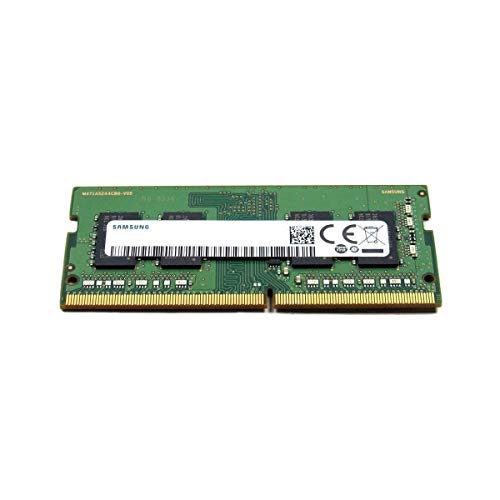
Type: Laptop DDR4, 4GB, 3200MHz, 260-pin SODIMM. Built for modern laptops that require higher-speed memory with tighter timings and better power efficiency than DDR3.
Best for: Upgrading a compatible laptop that supports DDR4 SODIMM, especially ultrabooks and thin-and-light models seeking faster app loading and smoother multitasking.
Why selected: DDR4 platforms deliver better performance per watt and wider availability of compatible devices, making this a future-proof choice for many laptops.
Caution: Not compatible with desktops or systems that use DDR3 or non-DIMMs; check laptop compatibility before purchasing.
Motoeagle 16GB Kit (4X4GB) DDR3 1333MHz

Type: Desktop DDR3, 4×4GB, 1333MHz, 1.5V, 2Rx8, non-ECC. This kit increases total capacity for desktops that need substantial multitasking headroom while staying within DDR3 limits.
Best for: Power users running multiple lightweight tasks across several applications on older desktops that still rely on DDR3.
Why selected: Provides a straightforward upgrade path to 16GB total with familiar DDR3 technology, good for improved multitasking on older rigs.
Caution: Mixing modules beyond a matched kit may affect stability; consult motherboard memory configuration guidelines before install.
Crucial 4GB DDR3 1600 MHz CL11

Type: Desktop DDR3, 4GB, 1600MHz, CL11. Crucial modules pair well with many mainstream desktops and offer easy installation and compatibility checks.
Best for: Users installing a reliable, no-frills memory upgrade on DDR3 desktops without overcomplicating compatibility decisions.
Why selected: Crucial is known for dependable desktop RAM and straightforward compatibility guidance, aiding simple upgrades.
Caution: DDR3 is aging technology; if your system supports DDR4, upgrading to DDR4 may deliver greater gains for new software.)
A-Tech 4GB DDR4 2666 MHz UDIMM

Type: Desktop DDR4, 4GB, 2666MHz, CL19, UDIMM. Suitable for newer desktops that require DDR4 memory, with easy installation and lifetime warranty support.
Best for: Upgrading a compatible DDR4 desktop that can utilize faster 2666MHz memory for improved system responsiveness.
Why selected: DDR4 platforms are widely available and offer better performance and energy efficiency than DDR3, making this a strong long-term choice.
Caution: Ensure motherboard supports 2666MHz; otherwise, memory will run at a lower supported speed.
Buying Guide: How To Choose The Right 4GB RAM Stick
What to check before buying
System type matters. Desktops use DIMMs (195+ pins) and often accept DDR3 or DDR4 depending on the motherboard. Laptops use SO-DIMMs (adjacent small form factor) and typically require DDR4 or DDR3 SO-DIMMs. Confirm the correct form factor and generation for your device.
Will 4GB be enough?
For basic tasks, 4GB may be sufficient. For multitasking, light photo editing, or older games, 4GB can still help, but consider upgrading to 8GB or more if the motherboard supports it and your budget allows.
DDR3 vs DDR4: Is it worth upgrading?
DDR4 generally offers higher bandwidth, lower power consumption, and better overall performance. If your system supports DDR4, prioritize DDR4 modules, especially for laptops and newer desktops.
Speed and latency: How important?
RAID-like performance gains come from higher speeds (MHz) and lower latency (CL). In practice, 1600–3200MHz ranges cover most consumer tasks; choose the fastest compatible speed available within your motherboard’s supported range.
Brand and reliability considerations
Well-known brands tend to offer easier compatibility support and clearer warranties. Use modules from trusted brands to minimize compatibility issues and ensure straightforward installation.
Installation tips
Power off the system, discharge static, and install modules in recommended slots per the motherboard manual. Use matching pairs for dual-channel configurations when possible for best performance.
Frequently Asked Questions
- Can I mix DDR3 and DDR4 RAM? No. DDR3 and DDR4 use different signaling and are incompatible with each other.
- Is 4GB RAM enough for Windows 10/11? It may be sufficient for light tasks, but more RAM improves multitasking and responsiveness, especially with modern software.
- Should I buy a single 4GB stick or a 2x4GB kit? A 2x4GB kit enables dual-channel operation, which improves performance versus a single stick.
- Will upgrading RAM change my CPU speed? No. RAM upgrades improve memory access performance but do not change CPU clock speeds.
- How do I know if my laptop supports DDR4 SO-DIMM? Check the manufacturer’s specifications or use a system scanner tool to verify memory type and maximum capacity.
- Is DDR3 RAM still available? Yes, but it’s older technology; DDR4 is the current standard for new systems.