Choosing the right 4-axis stepper motor controller is essential for reliable CNC routing, milling, engraving, and laser projects. This guide highlights five top-rated 4-axis controllers and compatible motors, detailing who each product suits best, potential limitations, and practical buying advice. The selections emphasize USB/Mach3 compatibility, multiple axis support, and ease of integration for hobbyists and small workshops alike.
Summary table of chosen products:
| Product | Type | Best For | Notes |
|---|---|---|---|
| LUNYEE CNC Controller Board | 4 Axis GRBL USB Controller | DIY CNC routers and laser engravers | Includes dual-drive Y, upgrade options |
| 4 Axis Nema23 DM556S Kit | Motor + Driver USB Mach3 | Mach3 users needing DSP-based drive | High subdivision, quiet operation |
| 3 Axis Nema23 DM556S Kit | DM556S Driver + Nema23 | Compact 3-axis setups, expanding to 4 | Good low-noise performance |
| RATTMMOTOR 4 Axis CNC Controller Kit | TB6600 Driver, USB Mach3 | Budget 4-axis systems | Solid DIY option with classic TB6600 |
| Banria 42 57 Stepper Driver | Integrated controller + driver | Preset modes and real-time control | Simple, compact integration |
LUNYEE CNC Controller Board 4 Axis GRBL

The LUNYEE 4 Axis GRBL control board is designed for DIY CNC routers, engravers, and laser systems. It integrates an ARM 32-bit controller and an A4988-based drive cluster, with provisions for DRV8825 upgrades. This board supports 12–24V DC input, a 5A drive limit per axis, and both 3P and 2P+2P interfaces. It accommodates X/Y/Z/A axes, including dual Y drive, a rotary axis option, and safety features like an emergency stop switch. It can drive 775 motors or 200–500W spindles. Best for builders prioritizing USB connectivity, straightforward GRBL operation, and flexible axis configurations.
Who it’s best for: hobbyists assembling a multi-axis CNC router or laser engraver who want an affordable, upgrade-friendly GRBL controller with ready-made driver modules. Caution: verify phase sequence for your motors to avoid damage during initial wiring.
Key considerations:
- Voltage compatibility: 12–24V DC input; ensure your power supply matches motor and spindle needs.
- Motor compatibility: supports Nema17/23; confirm current settings align with motor ratings (2A max, 1.5A recommended).
- Expansion potential: Y-axis dual drive and rotary axis enable future upgrades without a full system swap.
4 Axis Nema23 DM556S Kit

This kit pairs a 23HS2430B Nema23 motor with a DM556S driver in a 4-axis Mach3-friendly setup. The motor delivers 425 oz-in holding torque, suitable for moderate to heavy-duty hobby CNC tasks. The DM556S supports high- and low-subdivision modes (up to 51200 steps), enabling smooth operation across speeds. It’s compatible with a 20–50V DC supply and works with standard USB Mach3 control cards, making it convenient for Windows-based PCs. Best for users who want a robust, high-torque 4-axis solution with flexible microstepping and established Mach3 compatibility.
Who it’s best for: hobbyists or small shops needing strong torque and a straightforward Mach3 workflow. Caution: verify driver settings to prevent overcurrent on sensitive motors.
Why this was selected: strong torque, broad microstepping options, and compatibility with common Mach3 controllers simplify setup for 4-axis machines.
3 Axis Nema23 DM556S Kit
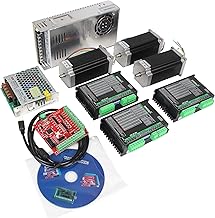
This kit provides a compact 3-axis DM556S-driven system with a Nema23 motor, suitable for small-format mills or laser engravers where space is limited. The DM556S driver features 32-bit DSP processing and supports 200–51200 microsteps, enabling smooth motion even at higher subdivision levels. It runs on 20–50V DC and is compatible with USB Mach3 control cards, letting a PC shape the toolpath with familiar software. Best for budgets-conscious builders starting with 3 axes and planning future expansion to 4 axes.
Who it’s best for: makers upgrading from a basic 2-axis setup or designing a compact 3-axis router. Caution: when expanding to 4th axis later, ensure the controller can accommodate extra axis wiring without reconfiguration.
Why this was selected: compact, cost-efficient, and maintains Mach3 compatibility for stepper-based CNC tasks.
RATTMMOTOR 4 Axis CNC Controller Kit

This kit centers on a 4-axis setup using TB6600 drivers and a USB Mach3 motion control card. It includes a 350W switching power supply and 23HS8430 motors, known for their reliability and robust torque. This option emphasizes classic, sturdy TB6600-based infrastructure that many hobbyists recognize and trust. Best for users who want a straightforward, budget-friendly 4-axis solution with familiar hardware. Caution: TB6600 systems can run noisier than newer microstepping drivers; ensure proper cooling and wiring to avoid heat buildup.
Who it’s best for: beginners or budget-focused builders seeking a dependable, easy-to-source 4-axis kit with Mach3 compatibility. Why chosen: established ecosystem, clear wiring, and broad community support.
Banria 42 57 Stepper Driver Controller

The Banria 42 57 series combines a controller and driver in one unit, offering integrated control with forward/reverse options, speed control, and multiple operation modes, including UART and external button control. It supports multi-scene applications and is suitable for DIY automation projects needing a compact footprint. Best for users who want a self-contained 4-axis control solution with adjustable speed and direction in a single package. Caution: ensure compatibility with your software and verify current limits match your motors to avoid overheating.
Buying Guide: Key Considerations for 4-Axis Stepper Controller Projects
- Software compatibility: Ensure the controller works with your software (GRBL, Mach3, or other). USB-Mach3 systems are common for Windows PCs.
- Axis and motor compatibility: Check the maximum current, torque rating, and wiring (A+/A-, B+/B-). Confirm supports 4 axes and any rotary or dual-Y configurations you plan to use.
- Power and heat management: Verify input voltage range and power supply requirements. Higher torque systems may require active cooling and proper heat sinking.
- Drive technology: A4988/DRV8825 vs. DM556S/TB6600 differ in microstepping, torque, and noise. Choose based on noise tolerance, precision needs, and maintenance preferences.
- Wiring complexity: Some kits have integrated drivers; others require separate stepper motors, drivers, and control cards. Factor in accessibility and future upgrades.
- Expansion potential: Consider future 4th axis compatibility, rotary axis support, limit switches, and Z-probes for automation and accuracy.
Frequently Asked Questions
- What is a 4-axis stepper controller best used for? — It enables precise control of three linear axes plus an additional axis for rotary or secondary linear motion, suitable for CNC routers, milling machines, and laser engravers.
- Do I need a dedicated driver for each axis? — Yes. Most 4-axis systems require one driver per axis, plus a control board compatible with your chosen software.
- Is Mach3 compatible with all 4-axis kits? — Mach3 compatibility varies by kit; confirm that the control card and drivers support Mach3 or your preferred software before purchase.
- What is microstepping, and why does it matter? — Microstepping smooths motion and increases precision by dividing motor steps into smaller increments; higher subdivision levels can improve surface finish but may reduce torque.
- Are USB-powered controllers safe for CNC machines? — USB interfaces are common for PC control. Ensure proper power supply sizing and protection to prevent USB connection issues during heavy loads.
- How can I avoid burning a motor during setup? — Correctly set maximum current to match the motor rating; wire phases accurately; and verify phase order before powering up the system.