Looking for a simple, reliable flip phone that still keeps up with basic modern features? This guide highlights top 3G/4G flip phones suited for seniors, travelers, or anyone who wants a straightforward device without the complexity of smartphones. Each pick balances essential calling and texting with easy-to-use interfaces, clear displays, and practical extras. Use this to compare which model fits your carriers, battery life, and usability needs.
| Product | Best For | Key Feature |
|---|---|---|
| TCL Flip 3 (T435S) 4G LTE Flip Phone | Verizon or GSM unlocked users who want a familiar flip design with dual displays | Dual displays, 1850mAh battery, 5MP camera |
| Tracfone, TCL FLIP 3, 16GB | Users who prefer a locked SIM option with a long-lasting battery | Dual displays, noise-canceling mic, long battery life |
| 4G Flip Phone Unlocked for Seniors (Matte Black) | Seniors needing large screens and simple controls | 2.8″ inner / 1.5″ outer screens, SOS button, large buttons |
| Unnecto Snap | Users who want a compact QWERTY flip with expandable storage | Full QWERTY keyboard, 32GB microSD expansion |
| artfone G6 Flip Phone for Seniors | Those needing durable design and a dedicated flashlight | 2.4″ + 1.8″ screens, SOS, big buttons, docking charging |
Notes: This table focuses on models that are widely used for straightforward calls, texts, and essential features. Availability and carrier support vary; check compatibility before purchase. The goal is to present options that are simple, reliable, and practical for everyday use.
Tracfone TCL Flip 3: Classic Flip, Modern Reliability

The Tracfone TCL Flip 3 combines a familiar flip design with modern basics. It features dual displays for quick time and message previews, a noise-canceling dual microphone setup for clearer calls, and a long-lasting 1850 mAh battery to stretch talk time between charges. Best for: users who want a trustworthy flip phone with solid battery life and straightforward operation. Caution: SIM card is included but separate purchase is not required in some configurations; confirm your carrier setup before use.
4G Flip Phone Unlocked for Seniors
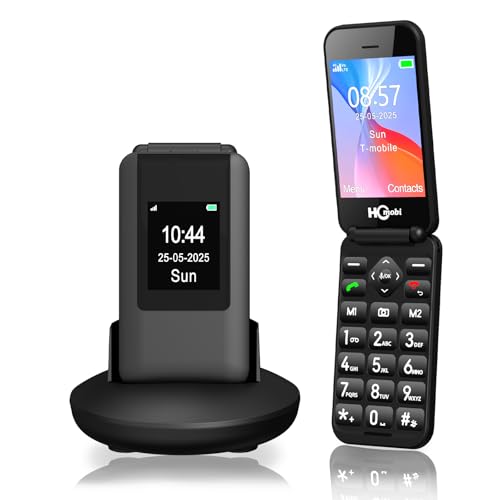
This 4G unlocked flip phone is designed with seniors in mind: a large 2.8″ inner screen and a 1.5″ outer display for quick checks. It supports 4G VoLTE and offers easy-to-use large buttons, clear volume, and a reassuring SOS feature. Best for: seniors or absolute beginners who prefer big buttons and simple navigation. Caution: Not compatible with CDMA networks like Verizon or AT&T in some configurations; confirm the preferred carrier’s compatibility before purchase.
Unnecto Snap: QWERTY Flip With Expanded Storage

The Unnecto Snap emphasizes a full QWERTY keyboard and expandable storage, making it a practical choice for quick texting and storing photos or audio. It is GSM-compatible and not for AT&T or CDMA networks. Best for: users who type frequently and want easy, tactile buttons. Caution: Not 5G capable and requires verification for your specific GSM carrier before ordering.
V3 4G LTE Flip Phone: Android Go Essentials

The V3 blends a classic flip experience with Android 11 Go for essential apps and features. It offers a 2.4″ main display and a 1.2″ outer screen, plus 2GB RAM and 16GB storage, with microSD expansion. Best for: users who want simple calling and texting plus light app use on a familiar form factor. Caution: Runs Go edition, so app compatibility may be limited compared to full Android.
artfone G6 Flip Phone for Seniors

The artfone G6 Pro pairs a durable hinge with a large-screen layout: a 2.4″ inner and 1.8″ outer display, plus a dedicated SOS button and a flashlight. It’s designed for easy dialing and texting with oversized buttons. Best for: seniors needing a sturdy flip phone with simple emergency features. Caution: Carrier compatibility is targeted at GSM networks; verify support with your provider before purchasing.
LIVELY Jitterbug Flip2: Caring Support In A Flip

The Jitterbug Flip2 is a flip phone designed to work with Lively’s service plans. It emphasizes big buttons, a strong speaker, and a simple, single-list menu. Best for: users who want straightforward phone use with access to Lively’s support team. Caution: It requires activation with Lively service and is not compatible with other carriers.
Buying Guide: Key Purchase Considerations For 3G And 4G Flip Phones
- Network compatibility: Verify whether the phone is unlocked, or tied to a specific carrier, and ensure it supports your preferred network (GSM vs CDMA, 3G vs 4G/LTE).
- Display size and readability: For seniors or users with vision challenges, larger inner and outer screens with clear contrast help reading caller IDs and messages.
- Battery life: Look for larger capacity batteries or longer talk-time claims to minimize charging frequency, especially when on the go.
- Physical controls: Big buttons, easy navigation keys, and a straightforward menu reduce learning time and errors during calls or texts.
- Emergency features: SOS buttons, simple speed-dial options, and loud speakers are valuable extras for safety and peace of mind.
- Storage and expandability: If you plan to store photos, contacts, or audio files, consider microSD expansion and keyboard comfort for typing.
- Durability and design: A sturdy hinge, simple shell, and reliable construction help prolong the device’s useful life in daily use.
- Software experience: Android Go or basic OS can affect app availability and performance. Choose based on how much you need beyond calling and texting.
Frequently Asked Questions
- What is the difference between 3G and 4G flip phones?
– 3G flip phones rely on older networks and are steadily phasing out in many regions, while 4G/LTE devices support faster data and broader compatibility with modern networks. - Can I use a flip phone with any carrier?
– It depends on whether the device is unlocked and the carrier’s network type (GSM vs CDMA). Always confirm compatibility before purchase. - Are SOS buttons common on flip phones?
– Yes, several models include dedicated emergency or SOS features for quick access in emergencies. - Do these phones support apps?
– Some models run Android Go or feature limited app capability; others are more traditional with basic calling/texting only. Check the OS and storage specs. - Is a SIM card required?
– Some phones include SIM cards or are SIM-free but require activation with a carrier. Verify SIM requirements in product details. - Which flip phone is best for seniors?
– Phones with large screens, big buttons, loud audio, SOS features, and easy navigation tend to be the most senior-friendly.