Discover top options that combine high-speed 3D printing with precise laser engraving capabilities. This guide highlights five versatile machines—ranging from auto-leveling flagship printers to multi-color systems and a dedicated laser engraver—designed for hobbyists, students, and professionals alike. Each product balances speed, accuracy, and ease of use to support creative projects, rapid prototyping, and classroom learning.
| Product | Brand | Type | Key Benefit |
|---|---|---|---|
| FLASHFORGE Adventurer 5M | FLASHFORGE | 3D Printer | Fully auto leveling; high-speed printing |
| FLASHFORGE AD5X | FLASHFORGE | Multi-Material 3D Printer | Multi-color and IFS; ultra-fast printing |
| Creality K2 Plus Combo | Creality | 3D Printer | Large build volume; full-auto leveling |
| Official Ender 3 | Comgrow | 3D Printer | Open-source; resume printing |
| ACMER S1 Laser Engraver | ACMER | Laser Engraver | High-precision laser engraving and cutting |
FLASHFORGE Adventurer 5M: Auto-Leveling Speed Printer

Powered by a CoreXY all-metal frame, the Adventurer 5M delivers 600 mm/s travel speed with 20,000 mm/s² acceleration. It features automatic bed leveling for flawless first layers, and a fast warm-up to 200°C in about 35 seconds. Its 280°C direct extruder supports rapid, reliable prints with minimal calibration, making it suitable for rapid prototyping and classroom use. The device incorporates a dual-sided PEI platform for easy model removal and versatile project setups.
FLASHFORGE AD5X: Multi-Color Printing Powerhouse

The AD5X delivers multi-material and multi-color capability with an Intelligent Filament System (IFS) for seamless filament management. It achieves up to 600 mm/s printing speed with accelerations up to 20,000 mm/s², while maintaining accuracy. An auto-leveling sensor ensures consistent first layers across complex prints, and the system supports PLA, TPU, PETG, and more, enabling vibrant, multi-color projects without manual color swapping.
Creality K2 Plus Combo: Large-Format, Auto-Leveling

The K2 Plus Combo combines a large 350 x 350 x 350 mm build area with full-auto leveling and a next-gen direct drive extruder. It supports multi-material setups linked via the Creality system and adds dual cameras for monitoring. Turbocharged acceleration of 30,000 mm/s² enables rapid prototyping, and compatibility with many materials expands its practical range from PLA to CF-reinforced filaments.
Official Ender 3: Open-Source Starter Printer
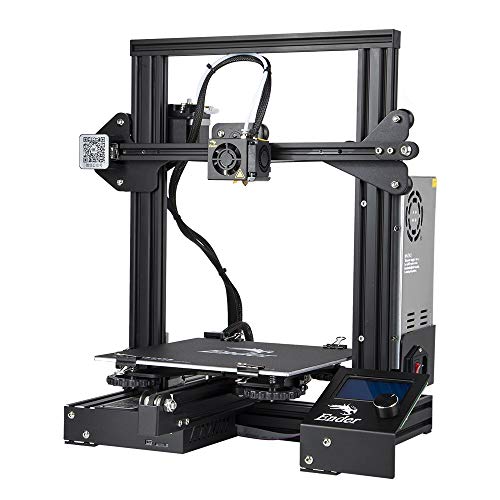
The Ender 3 emphasizes simplicity and community support. It offers resume printing after power outages and a straightforward assembly path ideal for beginners. Upgrades and aftermarket parts are widely available, enabling gradual improvement of extrusion, bed leveling, and print quality as users gain experience.
ACMER S1 Laser Engraver: Precise Wood, Metal, Glass Engraving

The ACMER S1 laser engraver features a 6000 mW diode laser with a 0.04 mm spot, enabling high-precision engraving and cutting across wood, acrylic, leather, and more. It includes AcmerTool engraving software and supports other popular workflows. With fast engraving speeds up to 10,000 mm/min and a 130 x 130 mm working area, it is a compact solution for detailed designs and small-batch projects.
Buying Guide
- Printing speed and acceleration: Look for machines with high mm/s travel speeds and strong accelerations for rapid prototyping, while balancing with print quality and motion stability.
- Auto-leveling and bed calibration: Auto-leveling reduces setup time and ensures consistent first layers, especially on larger beds or multi-material systems.
- Multi-material and multi-color capability: For creative projects, consider printers with IFS or similar systems to handle multiple filaments or colors without manual swapping.
- Enclosure and safety: Enclosed designs with filtration improve safety in home or classroom settings. Consider HEPA or activated carbon filters when using laser modules.
- Software compatibility: Free or bundled software (and support for popular third-party tools) helps streamline workflows from design to production.
- Build volume relevance: Choose a size that fits your typical projects, whether compact desk prints or larger prototypes requiring more space.
- Laser engraver versatility: For engravers, assess material compatibility, engraving speed, focal length, and software support to match your craft or business needs.
- Community and documentation: Strong online communities, tutorials, and firmware updates can significantly shorten the learning curve and expand capabilities.