Preserving memories from film negatives and slides is easier with a dedicated 35mm slide scanner. This guide highlights top options, including models from Kodak, Magnasonic, DigitConvert, DigitPro, and BEONE GLOBAL. Each model offers built‑in displays, simple one‑touch scanning, and varying memory and adapter options to suit different needs. Below, you’ll find a quick summary and detailed product sections to help you choose the right scanner for your archive, home display, or family storytelling.
| Product | Display | Film & Slide Support | Memory/Storage | Verbal Highlight |
|---|---|---|---|---|
| KODAK Slide N SCAN | 5” LCD | 135, 126, 110 slides; 50mm | SD card (not included) | |
| Magnasonic All-in-One 24MP | 5” Display | 35mm/110/126/Super 8 film; 135/126/110 slides | 128MB internal; SD up to 128GB | |
| DigitConvert Mobile Film Scanner | Compact, foldable | 35mm slides; 135 film | Smartphone app support | |
| DigitPro 35mm Slide Scanner | 2.4” LCD | 35mm negatives and slides | Included adapters for compatibility | |
| BEONE GLOBAL ClearScan MINI | 2.31” LCD | 35mm/135/126 film and slides | SD card support |
Each option provides a practical way to digitize memories, with varying emphasis on display size, file quality, and portability. The following product sections break down features, performance notes, and how they fit different archiving goals.
KODAK Slide N SCAN Film & Slide Scanner

The Kodak Slide N SCAN combines a 5” LCD display with a fast feed system for 135, 110, and 126 formats. It can convert color and black‑and‑white negatives and slides into 22MP JPEG files, saving directly to an SD card (not included). The model supports HDMI output for external viewing and includes adapters for standard film sizes plus a 50mm slide holder and a cleaning brush. It emphasizes a gallery mode for previewing and sharing memories in a digital frame-like experience. This unit is suitable for home archives and casual sharing with family.
Magnasonic All-in-One 24MP Film Scanner

Magnasonic offers a versatile 24MP solution with a 5″ LCD screen and optional HDMI output to view scans on a TV or monitor. It supports 35mm, 110, 126, and Super 8 film, as well as 135/126/110 slides. The scanner includes 128MB of internal memory and an SD card slot up to 128GB for long-term storage. With a focus on high detail and broad media support, it’s well suited for multi-format archives and users who want a single device for widespread conversion needs.
DigitConvert Mobile Film Scanner

This portable option emphasizes mobility and battery power, designed to scan 35mm slides and negatives quickly. It includes a free scanning app and claims compatibility with various smartphones, making it a convenient choice for travelers or casual users who want to digitize on the go. The foldable design facilitates compact storage and easy transport, ideal for preserving memories while away from a fixed desk setup.
DigitPro 35mm Slide Scanner
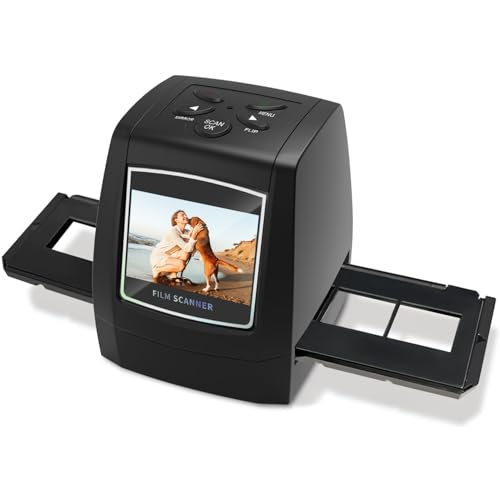
DigitPro’s model focuses on a compact, user-friendly experience with a 2.4” LCD for real-time preview. It supports 35mm negatives and slides with an included film adapter designed for stability during scanning. The device targets beginners and casual users who want quick conversions without a steep learning curve, offering straightforward one‑step scanning and easy parameter adjustments.
BEONEGLOBAL ClearScan MINI Film Scanner

The ClearScan MINI delivers up to 16MP scans on a small 2.31” display, aiming at maximum portability. It supports 35mm, 135, and 126 film formats along with slides, with SD card expansion for saving files. Its ergonomic design emphasizes ease of use and quick digitization, making it a solid pick for hobbyists who want a pocketable scanner that still delivers high‑quality results for individual images or small batches.
Buying Guide: Key Considerations for 35mm Slide Scanners
- Display size and viewing quality: A larger LCD helps preview scans before saving. Consider whether you want a built‑in display primarily for review or for sharing memories directly from the device.
- Media formats supported: If you own a mix of 35mm, 126, 110 slides, and various film types like Super 8, assess a device with broad compatibility to avoid buying multiple tools.
- Storage options: Built-in memory reduces clutter, but SD card support expands capacity. Check card type (SD/SDHC/SDXC) and maximum supported size.
- One‑touch scanning: A simple, intuitive workflow speeds digitization, especially for large archives. Look for devices with easy load trays and stable film adapters to minimize blurring.
- Output quality: Resolution varies from 16MP to 24MP to 22MP ranges. Higher resolution yields crisper digital images, but ensure the device preserves color fidelity and detail from old negatives.
- Portability: Travel-friendly, foldable, or compact designs suit on‑the‑go scanning. For home use, a larger screen and HDMI output can substitute for a dedicated monitor.
- File management and sharing: Consider whether the scanner saves as JPEG only or offers RAW-like formats, plus options for quick sharing to TV or cloud services via HDMI or network features.
- Price and compatibility: Compare adapter sets, included film trays, and whether cables (HDMI, USB) are provided. Ensure the model fits your budget and archive scope.
Selecting the right 35mm slide scanner depends on your priorities—whether you favor a bigger built‑in display for direct viewing, broad film format support for a mixed archive, or a portable option for quick travel scans. The models listed here provide a range of capabilities to suit family histories, school projects, and personal photo preservation efforts.