For immersive visuals and expansive screen real estate, a 32-inch curved monitor often offers the ideal balance of size, curve, and clarity. This guide highlights five top options that pair large, curved displays with solid gaming performance, smooth motion, and vibrant color. Each choice includes key features to help you compare at a glance and find the right screen for work, play, and media consumption.
| Brand | Model | Resolution | Refresh Rate | Curve |
|---|---|---|---|---|
| LG | 32MR50C-B | Full HD 1920×1080 | 100Hz | 1800R |
| Samsung | LS32D39DGANXZA (S3 S39GD) | Full HD 1920×1080 | 100Hz | 1800R |
| LG | 32GS60QC-B | QHD 2560×1440 | 180Hz | 1000R |
| Samsung | Odyssey G55C | QHD 2560×1440 | 165Hz | 1000R |
| SANSUI | 32-Inch Curved Gaming Monitor (WQHD) | QHD 2560×1440 | 180Hz | 1500R |
LG 32MR50C-B Curved Monitor Review
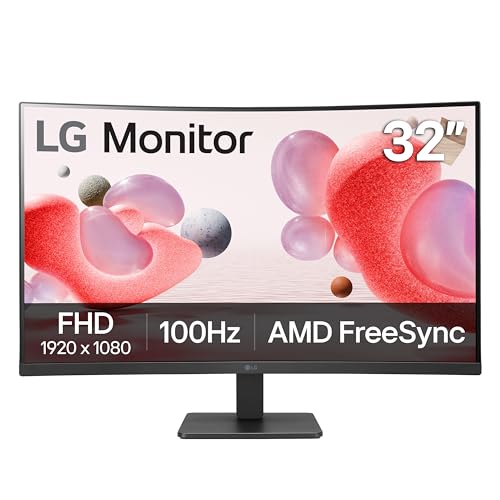
The LG 32MR50C-B presents a 32-inch curved display with Full HD resolution and a 100Hz refresh rate. Its VA panel delivers vivid color with deep contrast, suitable for everyday productivity and media viewing. The curved screen helps immerse users in video content and provides a broader viewing experience for multitasking. Features like OnScreen Control enable convenient quick adjustments, while Dynamic Action Sync reduces input lag for smoother interactions during light gaming and fast-paced tasks. The monitor also prioritizes eye comfort with a reading mode that reduces blue light, making it a practical option for extended work sessions.
Samsung S3 S39GD 32-Inch Curved Monitor

The Samsung S3 S39GD delivers an immersive 32-inch curved experience with a 100Hz refresh rate and a wide viewing angle. The 1800R curvature helps focus attention on the central image, reducing peripheral distractions. Built-in game modes and eye-friendly features support extended sessions, while the multiple connectivity options and the native 1080p resolution make it a practical choice for budget-conscious users seeking smooth video playback and casual gaming. The curved design is aimed at drawing you into scenes, which can be beneficial for productivity tasks that involve large spreadsheets or expansive timelines.
LG 32GS60QC-B Ultragear Curved Gaming Monitor

The LG 32GS60QC-B offers a high-refresh, fast-response gaming experience with a QHD resolution and a 1000R curved panel. At 180Hz and 1ms GTG, this monitor is designed for fast-paced gameplay and competitive titles where fluid motion and quick reactions matter. The 1000R curvature enhances immersion by wrapping visuals more deeply around the viewer, while HDR10 support broadens color and contrast for richer scenes. The monitor’s design emphasizes borderless aesthetics and its extra headroom for multitasking can benefit both gaming and content creation tasks.
Samsung Odyssey G55C 32-Inch Curved Gaming Monitor

The Samsung Odyssey G55C focuses on a wide, immersive field of view with a 1000R curved panel and QHD resolution. It delivers a 165Hz refresh rate and a 1ms response time in practice, reducing motion blur during fast gaming moments. AMD FreeSync support helps synchronize frame rates with compatible GPUs to minimize screen tearing. The combination of curved design, strong contrast, and high refresh makes it well-suited for gamers seeking a responsive and immersive experience, while still providing reliable color and clarity for general use.
SANSUI 32-Inch Curved Gaming Monitor WQHD

The SANSUI WQHD 32-inch curved monitor provides a 2560×1440 resolution with a rapid 180Hz refresh rate and 1ms OD response time. The 1500R curvature aims to wrap the action around the viewer for deeper immersion. FreeSync compatibility supports smoother gameplay, while HDR and a wide color gamut offer vibrant visuals. The model is noted for a solid blend of speed and color accuracy, making it suitable for competitive gaming as well as multimedia tasks that benefit from crisp detail and broad color representation. The inclusion of a sturdy stand and multiple input options adds practicality for desk setups.
Buying Guide: Key Considerations for 32-Inch Curved Monitors
Purpose and punch: Decide whether you prioritize gaming speed, color accuracy, or balanced performance. If gaming is primary, look for high refresh rates (120Hz–180Hz) and low response times (1ms–5ms). For work and media, color gamut coverage (sRGB, Adobe RGB, or DCI-P3) and image clarity at higher resolutions matter more.
- Resolution and clarity: 1080p is affordable for general use, but 1440p (QHD) provides sharper text and more workspace for productivity. 4K is rare in this size range and adds cost.
- Panel type and color: VA panels often deliver strong contrast for dark scenes; IPS panels provide wide viewing angles and accurate colors, though brightness may vary.
- Refresh rate and response: 60–75Hz is standard for casual use; 120–165Hz suits fast gaming; 180Hz is excellent for competitive titles, with 1ms response times improving motion clarity.
- Curve radius: A smaller radius (1000R–1500R) wraps more of the image but can appear oversized on some desks; a larger radius (1800R) provides a subtler immersion.
- Connectivity: HDMI and DisplayPort inputs are common; ensure enough ports for your devices and consider built-in speakers if desk space is limited.
- Ergonomics: Look for tilt, height, swivel adjustments, and VESA compatibility to fit your setup and reduce neck strain during long sessions.
When comparing models, weigh how a curved display aligns with your desk space, viewing distance, and daily tasks. For gamers, prioritize high refresh rates and fast response times; for productivity, prioritize higher resolution, color accuracy, and ergonomic adjustments. All five options featured here provide a balance of immersion and versatility suitable for living rooms, home offices, and dedicated gaming setups.