Answer: For a compact PC build or an office/HTPC setup needing multiple displays, a low-power graphics card with at least 2–4 outputs and driver stability is ideal. The top picks below are best for budget-conscious buyers who want multi-monitor capability without upgrading the power supply. These cards are suited for office work, light multimedia, and basic gaming at modest resolutions.
Summary table of chosen products:
- QTHREE GeForce GT 730 4GB — 4 outputs (2x HDMI, DP, VGA); low profile; PCIe X8; ideal for multi-monitor productivity.
- Glorto GeForce GT 730 4G — 4-output setup; strong multi-monitor support; Windows 11 compatible; good for HTPC/compact PC builds.
- maxsun GeForce GT 730 4GB — ITX-friendly; triple display support; compact form factor; good for small cases.
- MSI Gaming GeForce GT 710 — low power; dual display support; PCIe 2.0 x16 (x8); compact and quiet for office use.
- SAPLOS Radeon HD 6570 — dual HDMI outputs; DirectX 11; low power; suitable for legacy displays and light tasks.
QTHREE GeForce GT 730 4GB Graphics Card

Best for: Small form factor builds and multi-monitor users who need 4 outputs. The card uses a 64‑bit memory interface with 4GB DDR3 and a 1000 MHz memory clock, making it suitable for office tasks and light multimedia on up to four displays. It’s designed for PCI Express X8 and fits compact cases, including ITX chassis. This is a solid pick when you want a low-profile solution that doesn’t demand a high-wower PSU.
Why selected: It offers a full 4-monitor output setup (2x HDMI, VGA, DP) in a low-profile form factor, aligning with budget-conscious, space-limited setups. The Kepler-based GT 730 is sufficient for basic display work and media playback without heavy gaming.
Caution: Driver support can vary by OS and you should confirm Windows compatibility prior to purchase. Some users may experience limited modern gaming capabilities given its entry-level GPU core.
Glorto GeForce GT 730 4G Low Profile

Best for: HTPC or compact PCs that need reliable 4-monitor output and a straightforward driver experience. The 902MHz core frequency and 4GB DDR3 memory deliver dependable performance for everyday tasks and video playback on multiple screens.
Why selected: It’s a reliable GT 730 option with dual HDMI and additional output options, providing flexible multi-display arrangements. It’s equally suitable for Windows 11 environments with automatic driver updates.
Caution: As with other low-end GPUs, don’t expect modern AAA gaming at high settings. The card prioritizes display capability and efficiency over raw gaming power.
maxsun GeForce GT 730 4GB Video Card

Best for: Small ITX cases needing 3-monitor support and a compact, low-profile GPU. The card’s ITX-friendly design and 4K multi-screen capacity make it appealing for desktop users who want simple, space-saving upgrades.
Why selected: It combines ITX usability with a triple-monitor setup (HDMI, DVI, VGA) and a 4GB DDR3 memory pool, making it a versatile choice for low-power entertainment and productivity rigs.
Caution: As a budget option, real-world performance is best for non-intensive tasks; avoid this card for modern high-demand gaming at high resolutions.
MSI Gaming GeForce GT 710

Best for: Office workstations or home theater PCs needing a quiet, low-power graphics upgrade with two-display support. The GT 710 is designed for basic acceleration and is widely compatible with older systems.
Why selected: It is a low-power option that fits budget builds while providing sufficient performance for everyday tasks, media streaming, and light editing on two displays. The PCIe 2.0 x16 interface with x8 lane keeps compatibility broad.
Caution: It’s best used for light tasks; do not expect modern games to run smoothly at high settings.
PNY NVS 310 DVI Quadro
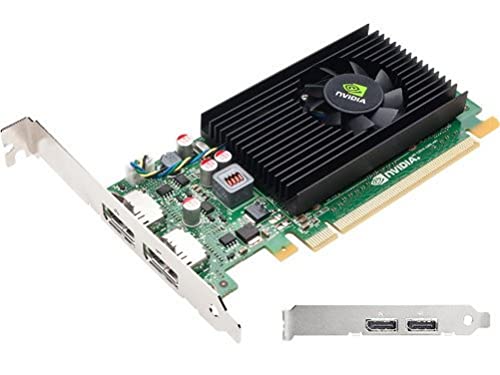
Best for: Professionals needing a stable, multi-display setup with reliable DVI/DisplayPort output on a budget. This is a workstation-oriented option suitable for office and CAD-like workflows on legacy systems.
Why selected: The NVS 310 features 48 CUDA cores and 512MB GDDR3, with DisplayPort 1.2 plus DVI-D SL support, making it a practical choice for multi-monitor productivity on older hardware.
Caution: It’s an older architecture with limited memory, so use it for basic productivity rather than 3D workloads or modern gaming.
PNY GeForce RTX 5070 Ti Epic-X ARGB OC

Best for: High-end enthusiasts who want cutting-edge features, even in a compact system with careful power management. This is a newer, more capable option in a tight space if your power supply supports it.
Why selected: This delivers DLSS, AI-boosted performance, and advanced CUDA cores for demanding tasks. It’s included here for users who need a future-ready card, provided the system can handle it.
Caution: This card may exceed typical 300W power budgets; verify power supply capabilities and case clearance before choosing.
Buying Guide: How to Choose a 300W Video Card
- Power Budget and Form Factor: Look for low-profile and ITX-friendly cards if you have a compact case. Verify the card’s stated power consumption and your PSU’s available headroom to avoid bottlenecks.
- Display Outputs: Consider how many monitors you plan to drive. Cards with multiple HDMI, DP, and VGA outputs offer flexible setups for office work, productivity, and home theater.
- Use Case and Performance: For office tasks, light multimedia, and streaming, a GT 730/710 class card is typically sufficient. If you need older DX11 titles or basic 3D acceleration, a chip like HD 6570 may fit legacy requirements.
- Driver and OS Compatibility: Ensure the GPU supports your current OS version. Some older cards may require legacy drivers, which can affect security and stability on new systems.
- Memory and Bus Width: A 4GB DDR3 with a 64-bit bus is common in budget cards and improves multitasking and display performance versus 1GB options. Higher memory counts help with multi-monitor desktops.
- Upgrade Path: Consider whether you might later upgrade the rest of the system. A card with a robust driver ecosystem and widely available compatibility reduces upgrade friction.
FAQ
- What does a 300W video card mean for my build?
It refers to the typical total power consumption of the GPU under load. Choose models that stay within your power supply’s capacity to avoid stability issues. - Can these cards support four displays?
Yes, several GT 730 variants offer 4-output configurations (HDMI, DP, VGA), enabling multi-monitor setups for productivity and entertainment. - Are low-profile GPUs suitable for gaming?
They are generally best for office tasks and light multimedia. Expect limited performance in modern gaming; consider higher-end GPUs if gaming is a priority. - Is Windows 11 support guaranteed on these cards?
Some models advertise Windows 11 compatibility; always verify driver availability and OS support for your exact card model before purchasing. - What is the best choice for a compact HTPC?
A GT 730 variant with a low-profile design and multiple outputs is typically ideal for streaming, video playback, and basic UI acceleration in an HTPC. - Do these cards require extra power connectors?
Most budget GT 730 and GT 710 cards are powered directly from the PCIe slot and do not require additional power connectors, which is convenient for older or smaller PSUs.