Entering the world of 3D printing can be overwhelming, but selecting a beginner-friendly model helps ensure success. This guide highlights five dependable options that balance ease of use, setup simplicity, and print quality for new users in the United States. Each entry includes key strengths, ideal use cases, and what to expect during initial setup. A quick summary table below helps you compare essentials at a glance.
| Product | Key Benefit | Ideal For | Approximate Setup Time |
|---|---|---|---|
| Upgraded Tina2S 3D Printer | Smart app and cloud printing | Home, school, quick-start projects | Less than 1 hour |
| Bambu Lab A1 Mini | Multi-color prints and auto calibration | Creative projects, multi-material workflows | 20 minutes |
| ELEGOO Neptune 3 Pro | Reliable base, smart leveling | Pprops and school labs with steady performance | Running minutes |
| Asani Fully Assembled Starter Kit | All-in-one starter with filament | Kids and classrooms | Out of the box |
| FLASHFORGE Adventurer 5M | Auto leveling and high-speed core | Rapid prototyping and education | Minutes |
Upgraded Tina2S 3D Printer From HEPHI3D

The Tina2S by HEPHI3D is a compact, fully assembled 3D printer designed for beginners who want a connected workflow. It features a self-developed app, Poloprint Cloud, enabling smartphone or tablet-based slicing and cloud printing. This model fits well in homes and classrooms, offering a broad model library and easy access to projects without heavy manual setup.
Key strengths include full open-source compatibility with popular software such as Cura and PrusaSlicer, plus USB transfer for model uploads. Noise reduction and a claimed print speed of up to 200 mm/s contribute to a smoother user experience, making it a solid entry point for learners who value quiet operation and straightforward online printing. The printer also emphasizes DIY potential for future customization.
Bambu Lab A1 Mini 3D Printer

The Bambu Lab A1 Mini emphasizes speed and multi-color capability with AMS lite options. It is designed for users who want higher performance without a steep learning curve. Auto-calibration removes manual bed leveling steps, letting beginners focus on designing and printing rather than fine-tuning hardware.
Notable features include a high-speed acceleration profile and a reliable auto-calibration routine, helping new operators achieve consistent first layers. Multi-color printing broadens creative opportunities for classroom projects or home crafts. While AMS lite enables color versatility, prospective buyers should consider compatibility with available filament ecosystems and whether they anticipate expanding to more complex multi-material prints in the future.
Asani Fully Assembled Mini 3D Printer Starter Kit

This complete starter kit from Asani targets kids and classrooms, delivering a fully assembled mini printer bundled with 10 meters of PLA filament, a microSD card loaded with designs, and additional accessories. The compact footprint makes it ideal for desks in classrooms and bedrooms alike, providing steady performance out of the box.
The zero-assembly requirement is a major selling point for beginners who want to start printing immediately. Features include auto-leveling for easier setup, a dual Z-axis rail for higher precision, and a 2.4″ LCD screen that helps users navigate a simple interface. The flexible magnetic build plate also eases print removal, an appreciated touch for younger users and educators.
FLASHFORGE Adventurer 5M 3D Printer

The Adventurer 5M is built for speed and convenience, featuring one-click auto bed leveling to ensure high-quality first layers with minimal setup. Its CoreXY design supports rapid printing, with an emphasis on efficient production and classroom-friendly operation. A detachable nozzle and a dual-sided PEI platform streamline workflow and part removal, making it a versatile choice for beginners who expect to pursue multiple projects quickly.
For new users, the Adventurer 5M provides a balance of speed, reliability, and ease of use. Its all-metal structure supports robust operation, while the automatic leveling reduces the typical trial-and-error period associated with novice printers. Consider whether you prioritize ultimate print speed or color and material flexibility when evaluating this model against others in the same tier.
Official Creality Ender 3 3D Printer
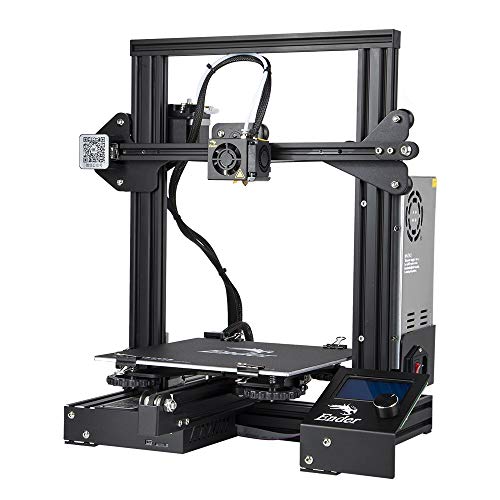
The Ender 3 is a proven, open-source classic that’s commonly recommended for beginners who want to learn assembly and tuning. It offers a resume printing function to recover from power interruptions and a robust extruder system that reduces the chance of clogs with typical filaments. Setup involves some hands-on assembly and calibration, which can be a valuable learning experience for hobbyists and students.
While not the most plug-and-play option, the Ender 3’s open-source ecosystem and plentiful community support provide strong learning resources. Prospective buyers should assess their willingness to invest time in assembly and tweaks versus seeking a more turnkey solution, especially for classroom environments or rapid prototyping needs.
Buying Guide: Key Considerations For Beginner 3D Printers
- Ease of Setup: Look for models labeled as fully assembled or beginner-friendly with auto-leveling or assisted calibration to minimize initial troubleshooting.
- Software Compatibility: Preferences vary, but compatibility with Cura, PrusaSlicer, and other common slicers helps users transition to more advanced projects later.
- Noise Levels: Quieter operation (often 40-50 dB or lower) improves the home or classroom experience, especially in shared spaces.
- Build Volume: Beginners benefit from a modest build area that still supports a wide range of projects, typically around 200 x 200 x 200 mm or similar.
- Reliability and Community: A strong user base and accessible replacement parts reduce downtime and provide abundant troubleshooting resources.
- Calibration and Maintenance: Auto-calibration, auto bed leveling, and easy bed-level adjustments save time and frustration in early prints.
- Material Support: PLA is the best starting filament; consider printers that support PETG or ABS as you advance, noting any temperature or enclosure requirements.
- Safety and User Experience: Features like enclosed builds (for kids) and intuitive interfaces contribute to a safer, more approachable learning curve.
For best results, choose a model that aligns with your intended use—education, hobby crafts, or quick prototyping. Consider the availability of spare parts, online tutorials, and customer support. If you anticipate teaching multiple students, a kit with included filament and designs can simplify lesson planning. Finally, balance price with features; core capabilities like auto leveling, reliable bed adhesion, and a straightforward software workflow often yield the most value for beginners.