Looking for a reliable 3.5mm headset with a microphone for work calls, school online learning, or gaming chat? This guide highlights five solid wired options that plug directly into PCs, laptops, consoles, or mobile devices. Each pick is evaluated for voice clarity, comfort, and durability, helping you choose the right one for your setup. Suitable buyers include students, remote workers, casual gamers, and anyone who wants a simple, device-wide headset solution.
| Product | Best For | Key Benefit |
|---|---|---|
| Logitech H111 | Budget calls and general multimedia | Noise-cancelling mic and full stereo sound |
| Logitech H151 | Versatile everyday use | Rotating mic and inline controls |
| Razer BlackShark V2 X | Console and PC gaming | 44mm-class drivers and cardioid mic |
| JBL Quantum 100M2 | Immersive gaming on multiple platforms | QuantumSound signature with detachable mic |
| Amazon Basics On-Ear | Compact, everyday calls | Foldable design and adjustable mic |
Logitech H111 Stereo Headset with 3.5 mm Jack

Best for: Budget-conscious buyers who need clear voice transmission for calls and everyday media. The H111 offers a noise-cancelling microphone and full stereo sound, making it a reliable entry-level option for remote work or online classes. The rotating boom mic can be worn on either side for comfort.
Why selected: It balances affordability with a straightforward design that focuses on clear communication and simple compatibility with PCs, Macs, laptops, smartphones, and tablets. The 3.5 mm jack ensures broad compatibility without drivers.
Limitation: As a wired, budget model, it may not provide premium passive noise isolation or ultra-soft ear cushions found on higher-end designs.
Logitech H151 Wired Analog Stereo Headphones

Best for: Users who want inline controls and a flexible microphone that moves out of the way during video or screen sharing. The H151 provides a versatile noise-cancelling boom mic and adjustable headband for comfortable all-day use.
Why selected: Its in-line controls and 3.5 mm jack ensure easy setup across devices. The microphone rotates for left- or right-side wear, and the headband/ear cups are designed to adapt to different head shapes.
Limitation: With an on-ear design, prolonged sessions can feel less cushioned than over-ear models, depending on user preference.
Razer BlackShark V2 X Xbox Gaming Headset

Best for: Gamers seeking strong audio clarity and a comfortable fit for long sessions. The headset uses a Triforce Titanium 50 mm driver design and a Hyperclear cardioid microphone to keep voice pickup focused while reducing background noise.
Why selected: The combination of enhanced audio tuning, a flexible mic with good mouth placement, and noise isolation makes it a strong pick for competitive gaming and streaming on PC or console.
Limitation: Slightly more premium build may affect price and weight compared to entry-level models.
JBL Quantum 100M2 Wired Gaming Headset

Best for: Gamers who want immersive, accurately tuned audio across PC, PlayStation, Xbox, and Switch. The Quantum 100M2 delivers JBL QuantumSound Signature with a detachable microphone for flexible use.
Why selected: The memory foam ear cushions and breathable fabric keep comfort high during longer sessions, while the detachable mic offers practical versatility for solo gaming or voice chat with friends.
Limitation: May be best suited for those who prioritize audio immersion; some users may prefer a lighter or more compact headset for travel.
Amazon Basics On-Ear Wired Computer Headset
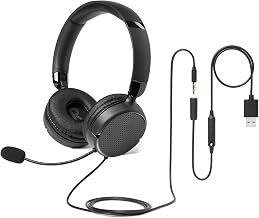
Best for: Small- to medium-sized heads seeking a compact, foldable headset for calls or online classes. The adjustable boom mic and in-line controls provide straightforward usability.
Why selected: The foldable design and 3.5 mm port compatibility offer practical portability and broad device compatibility, making it convenient for students and remote workers on the go.
Limitation: On-ear cushions may feel snug at first; comfort improves as the ear cups conform, which might take a short acclimation period.
Buying Guide: Key Considerations For Choosing A 3.5mm Headset With Mic
- Device compatibility: Look for a universal 3.5 mm jack and check if the headset supports both CTIA and OMTP wiring standards to work with phones, tablets, laptops, and desktops.
- Microphone type and placement: A cardioid or noise-cancelling mic helps reduce room noise. Detachable mics offer flexibility for gaming or solo listening.
- Comfort and fit: Consider ear cushion material, headband clamping force, and weight. For long sessions, memory foam and breathable fabric help reduce fatigue.
- Sound profile: If you need clear speech, prioritize microphones and voice clarity. For gaming or media, broader frequency ranges and comfortable drivers matter.
- Durability and design: Look for sturdy headbands, reinforced connectors, and a cable long enough for your setup. Foldable designs can improve portability.
- Controls and convenience: In-line volume and mute controls simplify quick adjustments during calls or gameplay.
FAQ
- Are 3.5mm headsets compatible with Windows and Mac computers? Yes, most 3.5mm headsets are compatible with Windows and Mac via the standard headphone/mic jacks, but some devices may require a combined audio port adapter.
- Do these headsets require drivers? No driver installation is typically needed for basic use; they function as plug-and-play devices.
- Is a detachable microphone better than a fixed one? Detachable mics offer versatility for different uses, while fixed mics provide a simpler, always-on approach.
- Which headset is best for gaming with a Switch? Headsets with a 3.5mm jack work across Nintendo Switch, PlayStation, Xbox, and PC, provided the console supports wired headsets.
- What is the difference between over-ear and on-ear designs? Over-ear designs generally offer better noise isolation and comfort for long sessions, while on-ear models tend to be lighter and more portable.
- Should I prioritize memory foam cushions? Memory foam cushions improve comfort during long listening or gaming sessions and can help reduce fatigue over time.