If you’re building a capable, quiet, and reliable gaming or workstation PC, a 280mm AIO liquid cooler is a strong choice. This guide highlights five strong options that balance cooling power, noise levels, and build flexibility. Best for: overclocking enthusiasts, silent-first builders, and system integrators who want clean cabling and modern features. The table below summarizes core distinctions to help you compare at a glance.
| Product | Best For | Notable Feature | Why It Stands Out |
|---|---|---|---|
| Corsair iCUE Link Titan 280 RX RGB | Premium iCUE ecosystems | iCUE Link System Hub, FlowDrive Engine | Strong integration, customizable lighting, high efficiency |
| ARCTIC Liquid Freezer III Pro 280 A-RGB | Value with robust cooling | Active VRM cooling, native Intel/AMD mounting | Excellent performance per dollar, smart VRM cooling |
| ARCTIC Liquid Freezer III Pro 280 | Solid all-rounder | Same frame with Pro features | Balanced temperature and reliability |
| NZXT Kraken Plus 280 | Feature-rich customization | 1.54″ LCD, CAM software | Highly configurable visuals and controls |
| NZXT Kraken Elite 280 RGB 2026 | Display-focused builds | 2.72″ IPS LCD, RGB sync | Large display, bold visuals |
| be quiet! Pure Loop 3 280 | Quietest operation | Pure Wings 3, whisper-quiet PWM pump | Low noise with solid cooling |
Corsair iCUE Link Titan 280 RX RGB Liquid CPU Cooler

The Corsair iCUE Link Titan 280 RX RGB is designed for users who value ecosystem integration. It features iCUE LINK that connects components through a single hub, simplifying cabling and enabling streamlined control for cooling, lighting, and performance. The FlowDrive cooling engine combines a three-phase pump with a precision cold plate profile to maximize heat transfer. Best for: builders who want a cohesive, expandable iCUE setup and an eye-catching RGB presentation. Limitation: the full benefits depend on adopting other iCUE LINK-compatible components.
ARCTIC Liquid Freezer III Pro 280 A-RGB

The ARCTIC Liquid Freezer III Pro 280 A-RGB emphasizes value and aggressive cooling performance. It uses an optimized contact frame for Intel LGA1851/LGA1700 and high-duty P14 PRO fans for strong airflow at a range of speeds. Best for: users seeking solid cooling with vibrant RGB and robust VRM cooling. Caution: RGB features are nice-to-have; performance is the core strength, and some users may prioritize more premium branding.
ARCTIC Liquid Freezer III Pro 280

The ARCTIC Liquid Freezer III Pro 280 is a strong all-rounder option that shares design with the Pro line. It emphasizes practical heat management through an efficient radiator layout and reliable PWM-controlled pump. Best for: builds needing dependable cooling with straightforward installation. Limitation: may not offer as many premium features as higher-end RGB ecosystems.
ID-COOLING Frostflow X 240 CPU Water Cooler

Note: This option is a 240mm radiator, not 280mm. It’s included here as a practical comparison for buyers who might consider slightly smaller radiators. Best for: smaller cases or budget-conscious builders who still want effective cooling with white LED accents. Caution: it does not meet the 280mm specification and is listed for reference only.
NZXT Kraken Plus 280
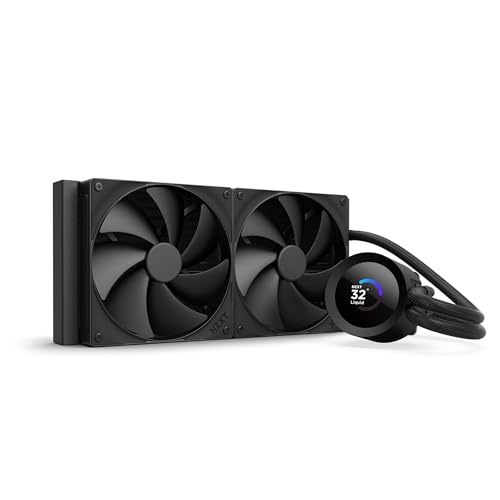
The NZXT Kraken Plus 280 focuses on performance and visual customization. It includes a 1.54″ LCD and robust CAM software controls, plus high-static-pressure fans for effective radiator cooling. Best for: enthusiasts who want dynamic display options and software-driven improvements. Caution: LCD features are hardware-intensive and depend on software compatibility for full effect.
NZXT Kraken Elite 280 RGB 2026

The NZXT Kraken Elite 280 RGB 2026 is built for display-forward builds. It features a large 2.72″ IPS LCD, vibrant color, and synchronized RGB with other devices. Best for: showcase PCs where aesthetics and on-screen real-time data are important. Caution: higher price and software complexity can be a consideration for simple builds.
be quiet! Pure Loop 3 280

The be quiet! Pure Loop 3 280 offers whisper-quiet operation with 2 Pure Wings 3 140mm PWM fans and a 3-phase PWM pump. Best for: silent-first builds where noise is a primary concern. Limitation: while very quiet, some users may prefer higher absolute cooling performance for extreme overclocking.
Buying Guide
What to consider when choosing a 280mm AIO:
- Compatibility: Check CPU socket support (Intel and AMD) and case clearance for a 280mm radiator. Ensure your motherboard and RAM layout won’t obstruct radiator fans.
- Cooling Power vs. Noise: Higher PWM ranges and pump efficiency reduce temperatures, but may increase noise at higher speeds. Decide if silent operation or maximum overclocking performance matters more.
- Software Ecosystem: Some coolers integrate with a single app or ecosystem (like iCUE or NZXT CAM). If you value centralized control for lighting and performance curves, consider compatibility with your other components.
- Display and RGB Features: LCD screens and RGB lighting add visual appeal. Ensure you actually use these features and that software supports your system.
- Maintenance and Durability: Look for pump reliability, fan quality, and ease of installation. Some models offer easier tube routing and cleaner cable management.
- Price-to-Performance: Evaluate whether premium features (RGB, advanced software, or hub integrations) justify the higher price for your build goals.
Frequently Asked Questions
- What is a 280mm water cooler best for?
Best for builds that require strong CPU cooling in mid-tower cases with sufficient radiator clearance and users who want balanced performance and quiet operation.
- Do I need a special case for a 280mm radiator?
Yes, ensure your case supports a 280mm radiator in the chosen mounting location and has airflow for optimal cooling.
- Is RGB lighting important for cooling performance?
No. RGB is primarily aesthetic; cooling performance depends on the pump, fans, and radiator capacity.
- Should I prioritize software ecosystems?
If you want cohesive lighting and performance tuning across components, yes—choose a cooler that integrates with your preferred software.
- Is custom LCD display worth it?
It adds customization and real-time monitoring, but it increases complexity and potential for screen-related issues in some setups.
- Which 280mm cooler is quietest?
Be quiet! Pure Loop 3 280 is designed for whisper-quiet operation, making it a strong pick for silent builds.