Discover top 27-inch QHD monitors that balance speed, color, and comfort for gaming and work. This guide highlights five strong contenders with high refresh rates, fast response times, and sharp 1440p detail. Each entry includes essential specs, standout features, and what to consider when upgrading your display. Whether you’re chasing competitive edge, immersive visuals, or multi-tasking efficiency, these monitors offer reliable performance for American buyers shopping on major retailers.
| Brand | Model | Key Benefit |
|---|---|---|
| LG | 27GS60QC-B Ultragear | Ultra-fast gaming performance |
| Dell | S2725DS | Balanced visuals with built-in speakers |
| ASUS | VG27AQ3A | ELMB Sync for sharp action |
| LG | 27GR83Q-B | 240Hz for extreme speed |
| LG | 27G640A-B | Premium HDR and flexible ports |
LG 27GS60QC-B Ultragear Curved Gaming Monitor

The LG 27GS60QC-B delivers a compelling blend of speed and immersion for gamers. Built around a 27-inch QHD panel, it peaks with a 180Hz refresh rate and 1ms gray-to-gray response, helping to reduce motion blur in fast-paced titles. A dramatic 1000R curved screen wraps the action, offering heightened peripheral awareness for competitive play. The monitor supports AMD FreeSync for tear-free gameplay and HDR10 for richer daylight and shadow detail. With its borderless design, multiple inputs, and a Stabilizer feature, this model emphasizes quick reactions and a focused viewing experience.
Dell S2725DS Monitor — 27 Inch QHD, Built-In Speakers

The Dell S2725DS focuses on visual clarity and integrated audio. Its 27-inch QHD (2560×1440) panel provides detailed imagery with 1.77 times more detail than Full HD, complemented by built-in 5W speakers for convenient desktop audio. The monitor is TÜV Rheinland Eye Comfort certified, helping reduce eye fatigue during long sessions. While the refresh rate sits at 100Hz, the overall color accuracy, contrast, and readability make it a solid choice for productivity, media consumption, and light gaming where comfort matters most.
ASUS TUF Gaming 27” VG27AQ3A — QHD, 180Hz

The ASUS TUF VG27AQ3A targets serious gamers with a 27-inch QHD panel, 180Hz refresh rate, and a rapid 1ms response time. ELMB Sync ensures blur-free visuals by combining ultrafast motion with synchronized backlight control, reducing ghosting without sacrificing adaptive refresh. It supports FreeSync Premium, is G-Sync compatible, and uses AdaptiveSync to maintain smoothness across diverse GPUs. The monitor also emphasizes color fidelity and immersive HDR-capable visuals, making it a versatile choice for competitive play and cinematic titles alike.
LG 27GR83Q-B UltraGear — 240Hz IPS

LG’s 27GR83Q-B stands out with a blistering 240Hz refresh rate and 1ms GtG on an IPS panel, delivering crisp images and quick transitions. It includes DisplayHDR 400 for brighter highlights and a wide color gamut, ensuring vibrant visuals. G-Sync compatibility, FreeSync Premium, and HDMI 2.1/DisplayPort inputs offer flexible connectivity for modern gaming rigs. The stand supports tilt, height, and pivot adjustments to optimize comfort during extended sessions, while the IPS panel maintains wide viewing angles for collaborative work or multi-monitor setups.
LG 27G640A-B — 300Hz IPS Gaming Monitor
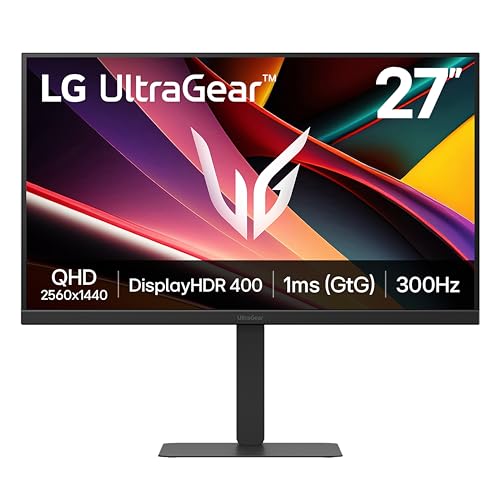
The LG 27G640A-B is designed for extreme-speed gaming with a 300Hz/1ms (GtG) combination, paired with a 27-inch QHD IPS panel. It emphasizes fast action, vibrant HDR visuals, and ample adjustability via a robust stand. The monitor supports NVIDIA G-Sync compatibility and AMD FreeSync Premium, enabling tear-free gameplay. With HDMI 2.1 and USB-C inputs, it connects easily to the latest consoles and laptops, while the VESA DisplayHDR 400 certification adds cinematic brightness and color depth to supported games.
Buying Guide: Key Purchase Considerations
- Refresh rate and response time: For fast-paced gaming, prioritize 165Hz or higher and 1ms GtG where possible. Some models push to 240Hz or 300Hz for esports timing.
- Panel type and color: IPS panels offer wide viewing angles and strong color accuracy, while VA panels may deliver higher contrast. HDR capability (HDR10 or DisplayHDR) adds brightness and color depth but varies by model.
- Adaptive sync: Look for FreeSync Premium or G-Sync compatibility to reduce tearing. Ensure your GPU supports the chosen sync standard.
- Ergonomics: Adjustable height, tilt, swivel, and pivot help reduce neck strain during long sessions. A curved screen (1000R) can enhance immersion but may affect multi-monitor setups.
- Connectivity: Check for HDMI 2.0/2.1, DisplayPort 1.2/1.4, and USB-C where applicable. Consider whether you need built-in speakers or a USB hub.
- Color and calibration: For productivity and media, prioritize color accuracy (DCI-P3 or sRGB coverage) and factory calibration where possible.
- Size and desk fit: A 27-inch diagonal suits most desks, balancing immersion with desktop real estate. Consider stand footprint and VESA compatibility for wall mounting.
- Usage balance: If you juggle gaming and work, look for a monitor offering both high refresh rates and reliable color for documents, design, and video.