Discover 24-inch monitors that double as TV-like displays for PC use. The following picks balance fast refresh, eye care, and connectivity for home offices, gaming, and everyday tasks. Each option supports full HD or better, multiple inputs, and VESA compatibility for flexible mounting.
| Product | Brand | Key Features |
|---|---|---|
| SANSUI ES-24F2 | SANSUI | 24″ FHD, 100Hz, HDMI/VGA, Eye Care, HDR10, FreeSync |
| Sceptre C248W-1920RN | Sceptre | 24″ 1800R curve, 75Hz, HDMI/VGA, built-in speakers |
| SANSUI 24″ Eye Care Monitor | SANSUI | 24″ FHD, up to 100Hz, eye-care features, HDMI/VGA |
| Sceptre E248W-FW100T | Sceptre | 24″, 100Hz, built-in speakers, multiple ports |
| KOORUI E2412F | KOORUI | 24″ 100Hz, VESA mount, 4000:1 contrast, eye-care |
Product selections explained
Introduction to the chosen options
The list below focuses on 24-inch monitors that fit well as PC displays with TV-like versatility. Each product offers at least one fast refresh rate, multiple inputs, and mounting compatibility where specified, ensuring smooth performance for both work and light gaming. The mix includes curved and flat panels, eye-care features, and built-in speakers where available.
SANSUI ES-24F2 24-Inch Monitor

24” Full HD 100Hz VA monitor designed for home, office, and light gaming. Features HDR10, FreeSync, and eye-friendly technologies such as low blue light and anti-glare. Connectivity includes HDMI 1.4 and VGA; HDMI cable included. No built-in speakers.
SANSUI ES-24F2: Key Specs
- Resolution: 1920×1080 (FHD)
- Refresh Rate: 100Hz
- Ports: HDMI 1.4, VGA (HDMI cable included)
- Tech: FreeSync, HDR10, Low Blue Light, Anti-Glare
Sceptre C248W-1920RN 24-Inch Curved Monitor

This 24-inch curved monitor delivers an immersive viewing experience with an 1800R curvature. It offers HDMI and VGA inputs, plus built-in speakers for desk-free audio. The display operates at 75Hz with a bright panel suitable for entertainment and productivity.
Sceptre C248W-1920RN: Key Specs
- Curvature: 1800R
- Refresh Rate: 75Hz
- Ports: HDMI, VGA, PC Audio
- Brightness: ~250 cd/m²
SANSUI 24-Inch Eye Care Monitor

Eye care oriented 24-inch Full HD monitor with up to 100Hz refresh, HDMI 1.4 and VGA inputs. The display emphasizes comfort with low blue light and flicker-free technology, making it suitable for long work sessions and study.
SANSUI 24 Inch Eye Care: Key Specs
- Resolution: 1920×1080
- Refresh Rate: up to 100Hz
- Ports: HDMI 1.4, VGA
- Special: Eye Care features, anti-glare
Sceptre E248W-FW100T 24-Inch Monitor

Built-in speakers provide compact desk audio while a 100Hz refresh supports smooth visuals. This model emphasizes a balanced feature set for work, media, and casual gaming with multiple inputs and blue-light reduction options for easier viewing over long sessions.
Sceptre E248W-FW100T: Key Specs
- Refresh Rate: 100Hz
- Speakers: Built-in
- Ports: HDMI, VGA, Display
- Eye/Blue-Light features
KOORUI E2412F 24-Inch Monitor
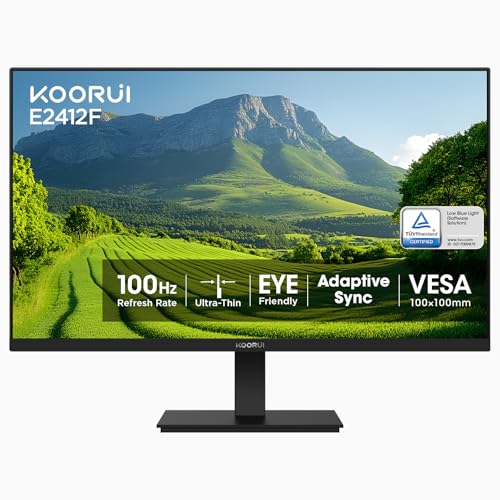
KOORUI’s 24-inch display balances 100Hz refresh with a high contrast ratio and TÜV Rheinland eye-care certification. The monitor supports VESA mounting and includes tilt for ergonomic setup, making it suitable for long workdays or study sessions.
KOORUI E2412F: Key Specs
- Resolution: 1920×1080
- Refresh Rate: 100Hz
- VESA Mount: 100×100 mm
- Eye Care: TÜV Rheinland certification
Buying Guide
- Panel type and image quality: IPS panels offer accurate colors and wide viewing angles, while VA panels can provide higher contrast. Consider which matters most for your tasks, such as photo editing or gaming.
- Refresh rate and response time: For general productivity, 60–75Hz is typically sufficient; for casual gaming and smoother UI motion, 100Hz delivers noticeable gains without requiring high-end hardware.
- Connectivity: Ensure the monitor includes the right inputs (HDMI or HDMI 1.4/2.0, VGA) and, if possible, DisplayPort for future-proofing. Built-in speakers can reduce desk clutter, but external speakers often deliver better audio.
- Ergonomics and mounting: Look for tilt, height adjust, pivot, and VESA compatibility (100×100 mm is common) to achieve comfortable viewing angles and desk arrangement.
- Eye-care features: Low blue light, flicker-free technology, and anti-glare coatings help reduce eye strain during long sessions.
- Curved vs. flat: Curved models provide immersive viewing for media and immersive tasks, while flat panels are better for tight desk setups and multi-monitor configurations.
- Durability and warranty: Check manufacturer warranties and build quality, especially for frequent daily use in home offices.
When selecting a 24-inch PC monitor with TV-like versatility, balance visual comfort, input options, and mount compatibility to fit your workspace. The options above provide solid all-around choices for both productivity and entertainment in a compact desk footprint.