Answering the quest for a compact, versatile 24-inch flat screen, these selections fit bedrooms, home offices, and small living spaces. Best for streaming, everyday computing, or gaming, each option offers a distinct strength. This guide highlights five 24-inch flat screens and explains who they suit best, plus a quick product comparison to help you decide.
| Product | Best For | Why It Stands Out |
|---|---|---|
| Roku 24-Inch Select Series | Streaming fans who want easy setup | Bright 720p HD with Roku simplicity and built-in streaming |
| INSIGNIA 24” Class F20 Series | Smart TV with voice control | Fire TV experience with Alexa voice remote and vast app library |
| LG 24U411A-B Monitor | Productivity and dual-monitor setups | Full HD IPS with slim bezels and 120Hz for smooth motion |
| InnoView 23.8” Portable Monitor | On-the-go second screen | Lightweight, 144Hz, USB-C/HDMI, flexible workspaces |
| Samsung 24″ S3 Monitor | Clear visuals for work and casual media | IPS panel with wide viewing angles and 120Hz |
Best for Easy Streaming and Simple Setup

The Roku 24-Inch Select Series delivers bright 720p HD and a streamlined Home Screen for quick access to streaming apps. It includes a voice remote and Wi‑Fi for fast setup. This option is best for buyers who want a dedicated small TV for bedrooms or kitchens, with an emphasis on streaming over gaming or desktop tasks.
Who it’s best for: casual viewers who prioritize ready-made streaming without extra hardware. Why selected: it emphasizes simple operation, automatic updates, and solid picture quality for a compact living space.
Caution: The 720p resolution may be limiting for users who require higher detail or desktop work on a larger scale.
Best for Alexa-Enabled Fire TV Experience
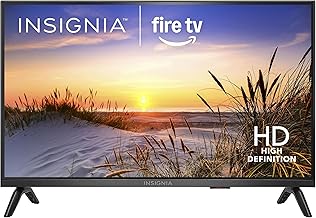
The INSIGNIA 24″ Class F20 Series blends Fire TV with Alexa voice control, giving hands-free access to thousands of apps and live TV. It’s ideal for users who want a compact smart TV with extensive content options. The included Alexa remote supports searching and switching inputs with voice commands.
Who it’s best for: households already using Alexa devices or Prime Video. Why selected: broad app availability, voice search, and easy input management in a small footprint.
Caution: The experience depends on app availability and internet quality; some apps may require additional subscriptions.
Best for Dual-Setup Productivity

The LG 24U411A-B is a full HD IPS monitor with 120Hz refresh, ideal for multitasking and smooth motion in both work and light gaming. Its slim bezels create a modern look that fits well in a dual-monitor setup or a clean single-monitor desk. It supports vibrant colors and wide viewing angles for consistent performance.
Who it’s best for: remote workers, students, and those who want crisp visuals for documents and media. Why selected: reliable IPS panel, high refresh rate, and space-efficient design.
Caution: Desktop use may benefit from a higher resolution color-accurate panel for photo editing or design work.
Best Portable Second Screen On The Go

The InnoView 23.8” portable monitor provides a large 1080p display with 144Hz, plus USB-C and HDMI connectivity. It’s lightweight and includes an adjustable stand, making it a strong choice for professionals who travel or work in multiple locations. It’s best for second-screen productivity or gaming on the go.
Who it’s best for: professionals and gamers who need a flexible, portable display. Why selected: high refresh rate, color accuracy, and easy transportability.
Caution: The larger size makes it less convenient for ultra-compact desks, and the integrated stand may require a stable surface for optimal use.
Best Value For Everyday Computing

The Samsung 24″ S3 monitor combines an IPS panel with a 120Hz refresh rate in a compact package. It offers vibrant color and smooth motion, suitable for office tasks, media viewing, and casual gaming. Its ergonomic design and wide viewing angles help reduce eye strain during long sessions.
Who it’s best for: users needing accurate color and consistent performance across angles. Why selected: reliable IPS panel, 120Hz for smoother content, and practical design.
Caution: It may not have as many built-in speakers or smart features as a dedicated TV model; intended primarily as a monitor.
Buying Guide
What to consider before buying a 24-inch flat screen?
- Screen purpose: Choose a TV-style panel for streaming and casual viewing, or a monitor for productivity and color accuracy.
- Resolution and panel type: 1080p is common at 24 inches; IPS panels offer wider viewing angles and accurate colors.
- Refresh rate: 120Hz is beneficial for gaming and smooth motions; 60Hz is fine for general use.
- Connectivity: Ensure HDMI, USB-C, or other ports match your devices. Portable monitors may need USB-C for power and video.
- Smart features vs. external devices: Built-in streaming apps reduce extra gear; dedicated PC monitors rely on connected devices.
Comparative tips: If you mainly stream and want a compact TV, choose a model with strong streaming apps and a friendly remote. For desk work or dual-monitor setups, prioritize IPS panels, height-adjustable stands, and slim bezels. For portability, favor lighter units with USB-C or multi-connection possibilities.
FAQ
- What is the benefit of a 24-inch screen for small spaces?
It fits comfortably on a desk or in a bedroom while providing adequate viewing area for movies, documents, and light gaming. - Are 720p TVs sufficient on a 24-inch screen?
Yes for casual viewing, but higher resolutions like 1080p offer crisper text and sharper images. - Is an IPS panel important for a monitor?
Yes, IPS provides better color accuracy and wider viewing angles, which helps in dual-monitor setups. - Should I choose a smart TV or a standard monitor?
Choose a smart TV if you want built-in streaming and voice control; pick a monitor for productivity and color-accurate tasks. - What is the advantage of a 120Hz refresh rate?
It reduces motion blur in fast-moving content like games and sports, creating smoother visuals. - Do portable monitors work with laptops and phones?
Most do via USB-C or HDMI and provide a flexible secondary screen for on-the-go work.