Answering the top questions about 2000W ATX power supplies: These units are best for heavy multi-GPU mining rigs, workstation builds, or enthusiast PCs requiring robust power delivery and efficient cooling. The following selections emphasize reliability, modularity, and strong protections. Best for high-end mining rigs, multi-GPU workstations, or power-hungry gaming PCs.
| Product | Best For | Key Advantage | Data Point |
|---|---|---|---|
| BestParts Upgraded 2000W Power Supply | Mega-load systems | Included cables and wide input range | 100-240V~, 15-12A, 60-50Hz |
| Pstaroth 2000W Mining Power Supply | 6–8 GPU rigs | Extensive PCIe interfaces, Active protection | 24PIN, 6+2PIN, 16x 6+2PIN |
| ASRock PG 1600G | Quiet, high-efficiency builds | Cybenetics Platinum, 90%+ efficiency | 180mm depth; 1600W |
| Corsair HX1500i | ATX 3.1 PCIe 5.1 systems | Platinum efficiency, modular | 12V-2×6, PCIe 5.1 |
| Be Quiet! Dark Power Pro 13 1600W | Quiet, demanding GPUs | 80 Plus Titanium, digital regulation | ATX 3.0/ PCIe 5.0 |
BestParts Upgraded 2000W Power Supply PSU Unit Replacement
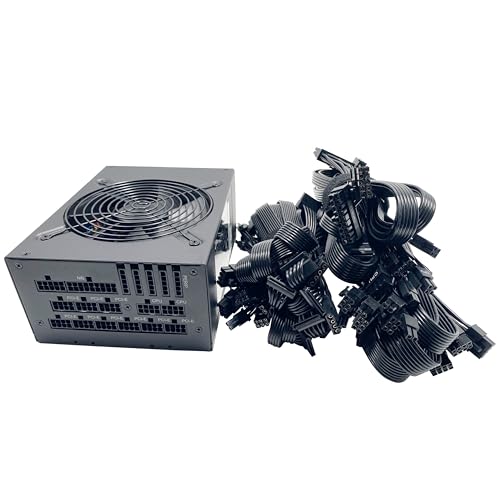
The BestParts 2000W unit is designed as a replacement for multi-GPU systems and high-load configurations. It includes cables and supports a wide input range for regional compatibility. Best for users upgrading aging PSUs in server or workstation builds that require stable power under heavy loads. Best for those who value a straightforward entry into high-widelity PSU setups without extensive modular options.
Best for: users needing a direct 2000W replacement with included cables and broad voltage input. Limitations may include case clearance and cable management in compact builds.
Pstaroth 2000W Mining Power Supply

The Pstaroth 2000W unit targets demanding mining rigs that run 6–8 GPUs. It features multiple 6+2PIN connectors and 24PIN interfaces to support large GPU arrays, with high-temperature protection designed to shut down if temperatures rise above safe levels. Best for builders prioritizing raw PCIe connectivity and protective safeguards in hot environments.
Best for: large GPU mining setups needing extensive PCIe connectors and a robust protection profile. Better for environments with reliable airflow; avoid this if your chassis cannot accommodate its length or the number of cables.
ASRock PG 1600G ATX 3.1 Power Supply

This 1600W unit is designed for high-efficiency builds and emphasizes quiet operation. It carries 80 Plus Gold with Cybenetics Platinum certification and a dedicated high-quality cable set. It’s best for users who want premium efficiency in a relatively compact powerhouse. A note: its depth of 180mm may not fit all cases, so verify chassis clearance before purchase.
Best for: enthusiasts seeking premium efficiency and low-noise performance. Choose this if your case supports deeper PSUs; avoid if clearance is tight or you need exactly 1600W with minimal depth constraints.
CORSAIR RM1000x ATX 3.1 Power Supply

While this model is a 1000W unit, it is included for comparison in contexts where power needs scale. It is fully modular, supports ATX 3.1, and offers solid efficiency with quiet operation. Best for mid-to-high tier builds that do not require 2000W but still demand robust modular cabling and PCIe 5.1 readiness. Limitation: not a true 2000W solution.
CORS AIR HX1500i 1500W Power Supply

The Corsair HX1500i offers 1500W of high-efficiency power with ATX 3.1 and PCIe 5.1 readiness. It features fully modular cabling and a quiet 140mm FDB fan, making it a strong option for power-hungry systems that don’t require the full 2000W. Best for users who want near-top-tier efficiency with flexible cabling; alternative for those who need exactly 2000W.
be quiet! Dark Power Pro 13 1600W

An ATX 3.0 unit with 1600W capacity, 80 Plus Titanium efficiency, and digital regulation. It supports PCIe 5.0 GPUs and includes 2x 12VHPWR cables. Best for silent, premium builds demanding top efficiency and robust voltage regulation. A limitation is its 1600W rating, which is below the 2000W mark for the strictest reads of “2000W” setups.
Buying Guide: Key Considerations For 2000W ATX PSUs
- Power headroom and your build type: For mining rigs with 6–8 GPUs, aim for true 2000W capacity or multi-rail configurations with ample PCIe rails. For gaming or workstation rigs, 1500–1600W models may suffice if you don’t run many GPUs at once.
- Efficiency and temperature: Higher efficiency (Gold/Platinum/Titanium) reduces heat and improves long-term reliability. Consider Cybenetics ratings and fan design (FDB vs, sleeve bearings) for noise in quiet environments.
- ATX 3.x compatibility: If using PCIe 5.0 cards or 12VHPWR connectors, ensure the PSU supports ATX 3.1/3.0 and includes native or required adapters. Check for PCIe 5.0 readiness for future-proofing.
- Modularity and cable management: Fully modular PSUs simplify build organization and airflow. For compact cases, verify cable length and PSU depth fits the chassis.
- Protection features: Over-voltage, short-circuit, over-temperature protection, and robust regulation help protect sensitive components in high-load scenarios.
- Warranty and service: Length and terms can vary; consider brands with strong support channels for product questions or assistance after purchase.
FAQ
- What does 2000W mean for a PSU and do I need that much power?
It indicates the maximum continuous output. You only need this if you run multiple GPUs, heavy professional GPUs, or power-hungry components simultaneously. - Is ATX 3.1 compatibility important for modern builds?
Yes, especially for PCIe 5.0 GPUs and 12VHPWR connections, as it helps manage peaks and power delivery safely. - Should I choose Titanium over Gold efficiency?
Titanium (or Platinum) reduces waste heat and uses less energy, which can matter for large, high-load systems and quiet operation over time. - What is the benefit of fully modular cables?
They reduce cable clutter, improve airflow, and allow you to connect only what your system requires for a cleaner build. - How do I verify compatibility with my case?
Check PSU depth (mm), length, clearance, and whether your case supports ATX 3.x PSUs with the required connectors.