If you’re seeking a private, centralized place to store and access photos, videos, and documents, a 2-bay NAS enclosure is a practical upgrade. This guide highlights five solid options, with clear who‑they’re‑for guidance and practical tradeoffs. It’s ideal for buyers moving from cloud storage or external drives who want long‑term control and simple backups.
| Product | Best For | Key Benefit |
|---|---|---|
| UGREEN NAS DH2300 | Beginners and personal users | Budget‑friendly private storage with easy setup |
| UGREEN NAS DXP2800 | Small teams and enthusiasts | More RAM and faster network options for multi‑user access |
| Synology 2‑Bay DiskStation DS223j | Home users prioritizing data ownership | Privacy, cross‑platform access, simple sharing |
| cenmate Aluminum 2 Bay Enclosure | Budget external storage with cooling | Hot‑swappable drives, good cooling |
| Synology 2‑Bay NAS DS223 | Small offices or households needing centralized storage | Centralized data with easy sharing and protection |
UGREEN NAS DH2300 2‑Bay Desktop NASyn

The DH2300 targets first‑time NAS buyers who want a simple, private storage hub for photos, videos, and documents. It supports up to 60TB total capacity with diskless packaging, making it a cost‑effective entry point for personal backups and media libraries. It’s best for individuals who value an easy transition from cloud or external drives and prefer a beginner‑friendly system. A limitation is that it does not support Docker or virtual machines, which may matter for power users seeking app flexibility. This model also emphasizes cross‑device backups across Windows, iOS, Android, and macOS.
Who this is for: A single user or small household looking for simple, private storage without ongoing subscription fees. If you want a one‑time purchase with straightforward backups and media access, this is a good match.
Why chosen: It combines a user‑friendly setup with robust capacity growth potential, bridging cloud migration with local control. The “set your devices free” approach helps consolidate files from multiple devices into one central NAS. It’s also a solid entry point for those who want to avoid complicated configurations.
Caution: This model does not include drives; you’ll need to supply storage drives separately. If you require Docker or VM support, consider other options.
UGREEN NAS DXP2800 2‑Bay Desktop NASyn

The DXP2800 is positioned for enthusiasts and small teams that want more performance and features. It offers a high‑end feel with 8GB DDR5 RAM and 2.5GbE networking, plus two M.2 NVMe slots for caching. The enclosure is still diskless out of the box, allowing you to tailor storage to your needs. It’s best for users who plan to centralize data and collaborate or share more frequently, while still preferring an approachable interface. Potential limitation: higher price and complexity relative to entry models.
Who this is for: A small team or power user who needs faster networks and cache options to smooth multi‑user access and media streaming.
Why chosen: It provides advanced hardware in a user‑friendly package, delivering better performance for simultaneous users without sacrificing straightforward NAS management.
Caution: Requires careful configuration for optimal caching and networking; not ideal for complete beginners who want the simplest setup.
Synology 2‑Bay DiskStation DS223j (Diskless)
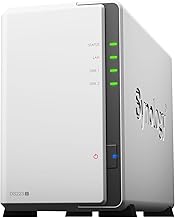
The DS223j emphasizes secure private cloud capabilities and cross‑platform access. It supports 100% data ownership, making it a strong choice for individuals and households prioritizing privacy and control. It also highlights easy sharing and syncing while keeping multiple collaborators on the same page. It’s suitable for users who want a reliable, straightforward way to back up media libraries or document repositories across devices. A potential limitation is that it may offer fewer advanced apps than some higher‑end Synology models.
Who this is for: Home users who value privacy, cross‑device access, and simple file sharing without heavy IT overhead.
Why chosen: It provides essential NAS features with strong data protection and straightforward setup, making it a reliable choice for private storage and easy collaboration.
cenmate Aluminum 2 Bay Enclosure

This aluminum 2‑bay enclosure is a practical external storage solution, suitable for users who need a simple, cost‑effective DAS (direct‑attached storage). It supports 2.5″ and 3.5″ drives with hot swapping and USB 3.0 connectivity. It’s best for budget buyers or users who want to quickly add storage without configuring a full NAS system. It’s important to note that this is a DAS device, not a NAS, so it does not offer network sharing by itself. Limitation: no built‑in NAS features or network services.
Who this is for: Individuals or small offices needing extra external storage with good cooling and easy drive access.
Why chosen: It provides a straightforward upgrade path for expanding drive capacity without network management overhead, while its cooling helps maintain drive health in continuous use.
Synology 2‑Bay NAS DS223 (Diskless)

The DS223 NAS again emphasizes centralized data storage with 100% ownership and cross‑platform access. It focuses on easy sharing and synchronization while keeping clients and collaborators aligned. It’s a strong option for small households or offices seeking reliable data protection and simple, scalable storage. A limitation is that this model, like many consumer NAS units, may require additional investments in drives to reach your storage goals.
Who this is for: Small offices or households needing cohesive data storage with straightforward sharing and privacy controls.
Buying Guide: How To Choose A 2 Bay NAS Enclosure
- What will you store? Consider whether you mainly back up documents, photos, videos, or a mix. If you need large media libraries, prioritize higher capacity and better RAM/CPU for smooth playback and backups.
- Performance vs. simplicity Decide whether you want an entry‑level system or a feature‑rich model. Beginners benefit from simple setup and automatic backups; power users may require faster networking and more RAM.
- Network options Look for 1GbE or 2.5GbE/2.5G or faster for multi‑user access and streaming. Higher network speeds help with simultaneous access and media serving.
- Storage expansion Check supported drive bays, RAID options, and total capacity. Some enclosures are diskless and rely on user‑supplied drives; others may offer dynamic expansion through additional bays.
- Data protection and backup Assess features like snapshots, cloud sync, and cross‑platform sharing. Strong data protection minimizes data loss risks during failures or malware events.
- App ecosystem If you want Docker, virtualization, or media servers, ensure the NAS supports the needed apps. Some models are better suited for basic storage and backups.
- Noise and cooling For home use, consider cooling design and noise levels. Aluminum enclosures with fans can reduce heat but may produce more noise.
- Price vs. long‑term value Weigh upfront cost against potential cloud savings and ongoing subscription fees. A one‑time NAS purchase often yields long‑term savings.
Frequently Asked Questions
- What is a 2‑bay NAS enclosure? A network‑attached storage device with two drive bays that lets you store and access data over a network.
- Do I need drives to use a NAS? Most NAS enclosures are diskless and require you to install drives. Some are external storage enclosures that do not function as network NAS without additional hardware.
- Is a NAS good for photo backups? Yes, many NAS devices offer automatic photo backups, organization features, and easy sharing across devices.
- Can a NAS replace cloud storage? A NAS can replace some cloud storage functions by providing private cloud access, backups, and local control, but hosting and maintenance are your responsibility.
- Is 2‑bay enough for a home family? For basic backups and light multi‑device sharing, two bays are typically sufficient; expandability depends on your drive capacity and planned services.
- Which NAS is best for beginners? Entry‑level, diskless models with intuitive interfaces and automatic backups are best for beginners.