Looking for a versatile 2-in-1 tablet that switches easily between tablet, laptop, and typing modes? These selections focus on 2-in-1 Android tablets with keyboards, styluses, and multi-mode use. Best for students, remote workers, and casual productivity on the go. The top picks below emphasize strong processing, expandable storage, and useful accessory bundles. A quick comparison table follows the intro to help you decide at a glance.
| Product | OS | RAM / ROM | Display | Best For |
|---|---|---|---|---|
| ZZB 2-in-1 Tablet Set | Android 15 | 8GB + 32GB (expandable) | 10.1″ IPS | Students, light productivity |
| Suicoey 10″ Tablet with Keyboard | Android 16 | 32GB RAM / 256GB ROM (expandable to 2TB) | 10″ display | Heavy multitasking, media |
| Bnegynng Android 15 Tablet | Android 15 | 20GB RAM / 128GB ROM (expandable) | 10.1″ HD IPS | Budget-friendly multitasker |
| RUIQIAI 10.1″ Tablet with Keyboard | Android 15 | 3+5GB + 32GB/1TB ROM | 10.1″ HD | All‑around 2‑in‑1 |
| HNVHNV Android 16 Tablet | Android 16 | 34GB RAM / 128GB ROM (expandable to 2TB) | 11″ 90Hz | Power users, multitasking |
ZZB 2-in-1 Tablet Set

Best for: Family use, students, and light work tasks. This Android 15 tablet ships with a Case, wireless Bluetooth Mouse, Stylus Pen, and a Bluetooth keyboard, enabling quick mode changes between tablet, laptop, and drawing. Google Play is pre-installed for easy app access. The 10-inch IPS display and a 6000 mAh battery support long sessions away from a charger. Consider this option if you want an all-in-one bundle without purchasing separate accessories.
Why chosen: The bundled accessory set adds value for a first-time 2-in-1 user or a student who needs portability with typing and input options. The Android 15 core promises responsive performance for everyday apps and streaming. Caution: The RAM is expandable via software, but physical RAM remains 8GB with 32GB storage, which may fill quickly with large apps or media libraries.
Suicoey Android 16 10-Inch 2-In-1

Best for: Power users who need multi-tasking headroom and ample local storage. The device runs Android 16 with Gemini AI, plus a bundle that supports up to 2 TB via microSD. It offers 32GB RAM (split as 4GB + 28GB extended) and 256GB ROM with 2 TB capacity via expansion, making it ideal for heavy app use, large media libraries, and professional workflows.
Why chosen: High RAM and robust AI features can improve productivity with smart scheduling and quick task switching. Widevine L1 certification supports streaming in HD. Limitation: 2 TB expansion is dependent on microSD cards and may require additional purchases beyond the base bundle.
Bnegynng Android 15 Tablet 2-in-1

Best for: Budget-conscious buyers who want a capable Android 15 experience with a keyboard and stylus. This tablet bundles include 20GB RAM and 128GB ROM, with expansion up to 2TB. It supports 5G WiFi6 and Widevine L1 for HD streaming, plus a 6000 mAh battery for daytime use.
Why chosen: Strong value with modern OS and multitasking ability. Caution: The RAM figure is presented as 20GB total (virtual + physical), which is less common; actual performance depends on how memory is allocated and used by apps.
QAZIPO 2-in-1 Laptop/Tablet (10.1″)

Best for: Students and remote workers who want Office 365 included and a true detachable keyboard for laptop-like productivity. This model provides a 10.1″ FHD IPS touchscreen, a magnetically detachable keyboard, and a suite of Office apps with 1 TB OneDrive storage.
Why chosen: The package emphasizes office productivity and portability with a familiar 2-in-1 form factor. Caution: The listing highlights Office 365 and OneDrive; performance will vary with task complexity and network connectivity.
COOPERS Tablet 10 Inch 15
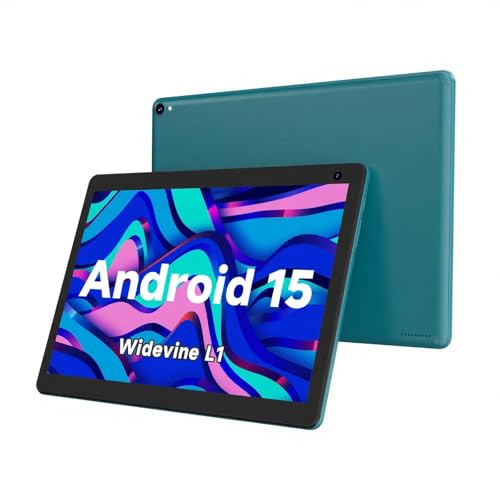
Best for: Budget-friendly 2-in-1 with solid basics. The COOPERS tablet runs Android 15 with Google Play pre-installed, 32GB ROM with 1TB expansion, and a 6000 mAh battery, offering a practical blend of performance and storage for everyday tasks.
Why chosen: This model provides essential features at a lower price point while supporting expansion and typical multimedia use. Caution: The 1280×800 display is modest by modern standards, so content clarity may be less sharp than higher-resolution boards.
Buying Guide: How To Choose The Best 2-In-1 Tablet
What OS should you choose? Android 15 or 16 options provide access to Google Play and broad app support. Android 16 adds Gemini AI features and improved privacy controls, which can boost productivity for heavy multitaskers.
What storage and RAM matter? Look for at least 8GB RAM and 128GB ROM for everyday multitasking. If you expect large libraries or professional apps, prioritize devices with 256GB or more and expandable memory to 1–2 TB via microSD.
Is a bundled keyboard and accessories worth it? A 2-in-1 that includes a keyboard, stylus, and mouse can save time and money for students and remote workers. Check if the case is sturdy and the keyboard offers comfortable travel.
What display quality is needed? A 10–11 inch IPS display with 1280×800 or higher resolution is typical. A higher refresh rate and Widevine L1 certification enable smoother visuals and HD streaming on major platforms.
Battery life and longevity? A 6000–8000 mAh battery is common. Consider devices with efficient processors and AI-powered optimization to extend on-the-go use without frequent recharging.
FAQ
- What is a 2-in-1 tablet? A device that can function as both a tablet and a laptop, typically including a detachable or foldable keyboard and sometimes a stylus for note-taking or drawing.
- Are Android 16 tablets worth it? Android 16 brings updated AI features and smarter resource management, which can enhance productivity and device personalization for power users.
- Do these devices support 1 TB expansion? Many models offer microSD expansion up to 1–2 TB via TF/microSD cards; verify the exact expansion limit in the product specs.
- Is Widevine L1 necessary for streaming? Yes, L1 certification allows HD and 4K streaming on services like Netflix and Disney+. If you stream often, prioritize L1.
- Which 2-in-1 is best for students? Look for models with good onscreen keyboard feel, long battery life, and bundled accessories to support class notes and assignments.
- What should I consider before buying? Assess your primary uses (note-taking, browsing, media, light gaming), required storage, accessory needs, and whether you prefer AI features or a clean, straightforward tablet experience.