For small offices and home offices that handle large documents, an 11×17 printer scanner can streamline workflows. The following five models emphasize big-format capabilities, reliable connectivity, and efficient paper handling. Each option is evaluated on print quality, scanning versatility, and ease of use to help you select the right fit for a busy environment.
| Product | Brand | 11×17 Capable |
|---|---|---|
| Brother INKvestment Tank Color All in One Printer MFC-J6955DW | Brother | Yes |
| Brother Genuine Wide Format All-in-One MFC-J6540DW | Brother | Yes |
| Brother MFC-J5340DW Professional All-in-One | Brother | Yes |
| Canon PIXMA TS9520 All In One | Canon | Yes |
| Brother MFC-J5855DW INKvestment Tank | Brother | Yes |
Brother INKvestment MFC-J6955DW: 11×17 Scanning And Ink Tank Advantage

The MFC-J6955DW combines a large 11×17 scanning area with the INKvestment Tank system for high-capacity in-box ink. It supports wireless printing, Ethernet, USB, and Wi‑Fi Direct, with dual-band networking for stable connections. Security features include triple-layer protection and controlled print access, making it suitable for small business environments that require document privacy alongside big-format output. The in-box ink can significantly extend operational periods between cartridge changes, reducing downtime for busy offices.
Brother Wide Format MFC-J6540DW: Fast 11×17 All-in-One
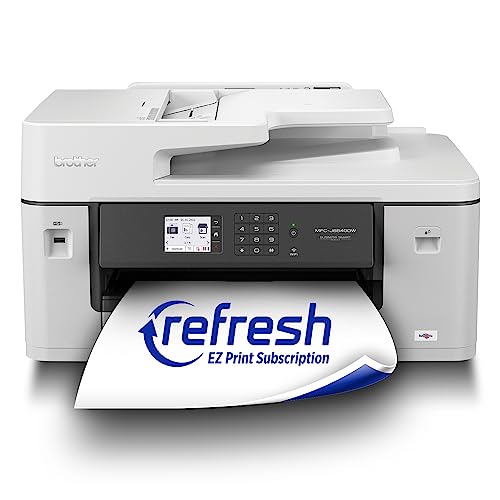
This all-in-one handles print, scan, copy, and fax up to 11×17 inches with a 28-page-per-minute capability, making it ideal for bold presentations and large documents. Dual-band wireless connectivity, plus USB and Ethernet options, support flexible office layouts. The device includes a robust 250-sheet paper tray and a 50-sheet ADF to maintain workflow momentum. Integration with mobile apps enables on-the-go printing from compatible devices, aligning with modern office routines.
Brother MFC-J5340DW Pro Wireless Color Inkjet

Designed for professional reliability, the J5340DW offers ledger-size 11×17 printing, scanning, copying, and fax with fast performance. The MAXIDRIVE engine ensures higher speed and consistent output. A 250-sheet tray plus a 50-page ADF supports heavy workloads, while flexible paper handling accommodates various media. This model is suitable for offices needing large-format capabilities without sacrificing speed or reliability.
Brother MFC-J5855DW: Year-Long Ink and 11×17 Capabilities

The MFC-J5855DW features INKvestment Tank technology with up to a year of ink in-box, reducing frequent replacements. It prints on ledger-size media up to 11×17 and blends high-volume performance with a 250-sheet tray and a 50-page ADF. The MaxIDrive print engine delivers durable, color-rich output for reports, proposals, and client-ready materials, making it a practical option for growing offices that need cost efficiency and big-format results.
Canon PIXMA TS9520: Versatile 11×17 Wireless All-in-One

The PIXMA TS9520 is a multi-function all-in-one with 11×17 printing, scanning, and copying in a versatile home or small office setup. It supports AirPrint, Mopria, and Wi-Fi with Ethernet, enabling easy wireless printing from mobile devices. The 5-color individual ink system aids in producing sharp text and vibrant photos, while the Auto Document Feeder and 11×17 paper handling expand capabilities for larger projects and multi-page documents.
Brother MFC-L3720CDW: Color Laser For Office Workflows

This laser option delivers high-speed color printing with a strong feature set, including auto duplex and a robust 50-page ADF. While laser printers are distinct from inkjet devices, they remain a commonly chosen solution for large-volume, professional documents. Dual-band wireless, USB, and wired networking support multiple users and devices, making it a flexible option for busy offices requiring dependable traffic throughput.
Epson Expression Photo XP-970: 11×17 Photo-Centric Printing

The XP-970 focuses on high-quality photo and enlarged paper handling, with 11×17 print capability and a dedicated photo workflow. While it emphasizes photo output, it also provides scanning and copying functionality that may suit creative workflows or proofing needs. Wireless options include Wi-Fi and Ethernet, supporting mobile printing through compatible apps, and the printer accommodates a range of media sizes for flexible use.
Buying Guide: Key Purchase Considerations
- 11×17 capability and document handling: Confirm the maximum supported paper size and whether the device handles ledger-sized prints, scans, and copies with a reliable feeder and tray system.
- ink system and cost per page: Consider INKvestment Tank or high-capacity ink systems for lower downtime and reduced cartridge changes, especially in high-volume environments.
- Connectivity and mobile printing: Ensure dual-band Wi-Fi, Wi-Fi Direct, Ethernet, and USB are available. Look for native apps that enable easy printing from mobile devices and cloud services.
- Security and access control: For businesses, triple-layer or enterprise-grade security helps protect sensitive documents and manage user access to printing functions.
- Paper handling and speed: Evaluate paper tray capacity, automatic document feeder (ADF) size, and print speeds (ppm) to match office throughput requirements.
- Scalability and future-proofing: If your workload grows, prioritize models with expandable trays or compatible cartridges and reliable vendor support.