Answering the search for a high-speed, 8-port switch, this guide highlights top 10G/Multi-Gig options designed for easy plug-and-play setup. These switches are best for small offices, media-heavy home networks, and enthusiasts needing fast local transfers with 10G or multi-gig connectivity. In this selection, you’ll find models suited for desktop or rack mounting, with auto-negotiation and fanless designs to reduce noise. Below, compare 5 strong choices and see who each model serves best. A quick summary table follows to help you decide at a glance.
| Product | Best For | Key Benefit |
|---|---|---|
| TP-Link TL-SX1008 | Power users and small workgroups | 8× 10G ports with auto-negotiation |
| NICGIGA 8-Port 10G | High-bandwidth NAS and gaming PCs | 8× 10G/5G/2.5G/1G/100M ports |
| TP-Link TL-SX105 | Dense desktop setups | 5× 10G ports, fanless design |
| MokerLink 8-Port 10Gbps | Open SFP flexibility | 8× 10G SFP+ slots with 160Gbps |
| NETGEAR GS108MX | Mixed 1G/10G needs | 1× 10G/Multi-Gig port plus 8× 1G |
TP-Link TL-SX1008: 8 Port 10G/Multi-Gig Unmanaged Switch

The TL-SX1008 provides eight 10-Gigabit ports, enabling 10G/multi-gig bandwidth for devices like 10G NAS, PCIe adapters, servers, or high-end workstations. It supports auto-negotiation across 5 speeds (100Mb/1G/2.5G/5G/10G) for broad compatibility and optimal performance. A smart fan and IEEE 802.3X flow control contribute to reliable, quiet operation. This model is a strong pick for users who need robust local switching with minimal setup.
Best for: small offices or power users who require full 10G interconnectivity across all ports. Better for setups where every device can benefit from 10G uplinks and near-zero configuration is preferred. Caution: may be overkill if most devices only support 1G speeds.
NICGIGA 8-Port 10G Ethernet Switch

The NICGIGA model combines 8× 10G/5G/2.5G/1000M/100M ports with a 160Gbps switching capacity, providing flexible multi-gig support for NAS, WiFi 6/7 backbones, and high-speed workstations. It emphasizes auto-negotiation for compatibility with diverse devices and offers a plug-and-play setup with MDI/MDIX auto-sensing. The single-lane, non-blocking forwarding helps maintain steady performance under load.
Best for: users needing strong multi-gig versatility and a simple, no-fuss deployment. Choose this if you anticipate devices operating at 2.5G/5G/10G and want straightforward expansion. Caution: some environments may require SFP modules to reach the highest 10G uplinks.
TP-Link TL-SX105: 5 Port 10G/Multi-Gig Unmanaged Switch

The TL-SX105 delivers five 10G ports in a compact design with fanless operation for silent performance. Auto-negotiation supports 100Mb/1G/2.5G/5G/10G, enabling a range of devices—from 10G NAS to WiFi 6 APs—without extra configuration. This switch is ideal for desktop-centric setups seeking high speed with minimal noise and small footprint.
Best for: users needing a compact, quiet 5-port 10G switch for a high-speed desktop or small office corner. Better for environments where space and noise are critical considerations. Caution: with only five ports, expansion may require a larger switch later.
MokerLink 8-Port 10Gbps SFP+ Switch
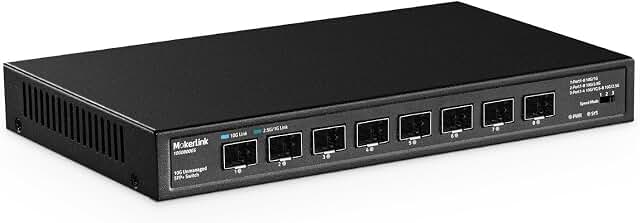
The MokerLink switch uses 8× 10G SFP+ ports, supporting 1G/2.5G/10G optical modules via dip switches for flexible rate control. It has a total bandwidth of 160Gbps and non-blocking line-speed forwarding. It accepts standard SFP modules (not included), offering open SFP flexibility for fiber or copper options.
Best for: networks needing fiber-friendly, open SFP+ compatibility and non-blocking 10G performance. Choose this if you plan to mix optical modules and want broad customization. Caution: requires SFP modules (not included) for full 10G fiber operation.
NETGEAR GS108MX: 8-Port 1G/10G Unmanaged Switch

The NETGEAR GS108MX offers 1× 10G/Multi-Gig port plus 8× 1G ports, enabling high-speed access where mixed speeds are common. It supports auto-negotiation for seamless compatibility with existing Cat5e/Cat6 cables and provides a simple, plug-and-play experience with flexible desktop or wall-mount options.
Best for: users with a mix of legacy 1G devices and a single high-speed link (10G/Multi-Gig) for a workstation or small office. Better for upgrading a portion of a network while keeping legacy devices intact. Caution: only one 10G/Multi-Gig port limits high-speed uplinks when more 10G ports are needed.
Buying Guide
What should you look for in a 10G eight-port switch? Consider port speed distribution, total switching capacity, and physical design. If you need every port at 10G, models like the TL-SX1008 and NICGIGA are strong candidates. For quieter environments, fanless options such as the TL-SX105 are ideal. Open-SFP flexibility, as found in MokerLink, appeals to users who want fiber or versatile media support.
Key purchase considerations
- Port speed and auto-negotiation: Ensure the switch negotiates to the best speed for each connected device.
- Form factor: Desktop vs. wall-mount or 19-inch rack mounting affects placement and integration.
- Noise and cooling: Fanless designs are preferable where quiet operation matters; fans may add some noise.
- Networking goals: For NAS, servers, or gaming rigs, prioritize switches with high switching capacity and stable non-blocking performance.
- Module compatibility: If you plan to use SFP modules, verify whether they’re included or must be purchased separately.
How to choose among these five
- Best for full 10G uptime on all ports: TL-SX1008 or NICGIGA.
- Best for quiet office spaces: TL-SX105 with its fanless design.
- Best for fiber or modular setups: MokerLink with SFP+ flexibility.
- Best for mixed-device environments: NETGEAR GS108MX, providing one 10G and multiple 1G ports.
Installation and maintenance tips
- Place switches in well-ventilated areas to maintain performance and longevity.
- Use auto-negotiation-enabled devices to maximize compatibility across ports.
- Document device connections to simplify future upgrades or troubleshooting.
Frequently Asked Questions
- What is a multi-gig port? It supports speeds between 1G and 10G, typically 2.5G or 5G, for faster local transfers without upgrading all devices.
- Do I need a 10G switch if most devices are 1G? Not always; you may only need one or a few 10G ports for NAS or servers, while the rest operate at 1G.
- Is fanless always better? Fanless switches run quietly, but active cooling can help maintain performance under sustained workloads.
- Can I mix fiber and copper connections? Yes, with SFP/SFP+ modules you can connect fiber links and copper Ethernet on the same network.
- Do these switches require a router or controller? Unmanaged switches are plug-and-play and do not require a central controller or software.